
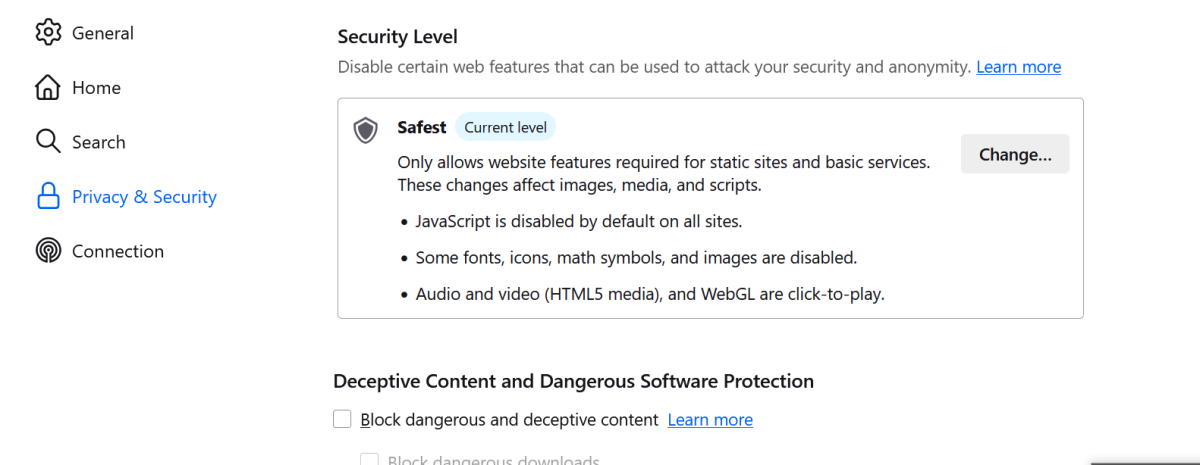
Most onion sites won't expose your identity simply because JavaScript is enabled. However, active scripts can increase fingerprinting opportunities, expand the browser attack surface, and have historically been used in exploit chains targeting anonymity tools. That is why many privacy researchers still recommend disabling JavaScript by default when accessing unknown onion services. If you are new to the scene, it is important to understand what the dark web is before diving in. While JavaScript does not automatically expose you, it can significantly increase the risk of browser fingerprinting and create a potential delivery vector for exploits. In rare cases, these exploits can lead to de-anonymization. While this breaks the visual experience of many websites, the trade-off is often necessary for high-threat models. This guide explains the technical reasoning behind this practice, the nuance between "risk" and "certainty," and how to configure your browser for 2026's dark web reality.
QUICK ANSWER
Privacy experts disable JavaScript on onion sites primarily to minimize the risk of browser fingerprinting and block malicious code execution. While JavaScript does not inherently bypass Tor encryption, it can be used to exploit browser vulnerabilities or identify unique system characteristics, which may allow adversaries to de-anonymize users in specific exploit scenarios.
2026 RECOMMENDATION
Use this guide to determine your ideal security level based on your specific threat model.
| User Type | Recommended Setting |
|---|---|
| Casual Tor users | Safer |
| Privacy enthusiasts | Safest |
| Journalists | Safest |
| Researchers | Safest |
| Whistleblowers | Safest |
IMPORTANT CONTEXT
Security recommendations depend on your specific threat model. Users facing nation-state surveillance, source protection requirements, or other high-risk situations may require stricter settings than casual privacy-conscious users.
Why Privacy Experts Disable JavaScript on Onion Sites
The decision to disable JavaScript is often based on risk management rather than the guarantee of an attack. Here are the specific vectors experts consider.
1. Browser Fingerprinting
When JavaScript is enabled, it can query a vast amount of information about your device. It can detect screen resolution, timezone, installed fonts, and battery status. Because most Tor users look identical (using the same browser version and window size), any deviation—caused by JavaScript reporting a unique font or resolution—makes you stand out. Experts disable JS to maintain uniformity with the crowd.
2. The Delivery Vector for Exploits
Historically, operations like "Operation Torpedo" utilized JavaScript not to be the exploit, but to deliver it. One example often cited by researchers is Operation Torpedo, where law enforcement used malicious code in an investigation targeting hidden services. JavaScript itself does not magically reveal your IP address. However, if the Tor Browser has an unpatched vulnerability (a bug in the code), a malicious script can be crafted to trigger that bug. This is known as Remote Code Execution (RCE). If successful, the exploit breaks out of the browser's sandbox and may run code that sends your real IP address to a server. Disabling JavaScript removes the primary delivery mechanism for these exploits.
3. WebRTC and DNS Leaks
WebRTC is a protocol that often relies on JavaScript to enable real-time communication. Tor Browser includes protections against direct network requests, but researchers generally recommend minimizing active content because browser vulnerabilities can occasionally create unexpected communication paths. Disabling JS ensures these communication channels remain closed.
4. Cross-Origin Request Attacks
Modern web security relies on the Same-Origin Policy, which restricts how a document or script loaded from one origin can interact with another. However, zero-day exploits are occasionally discovered that bypass these restrictions. If an attacker can bypass these policies via a malicious script on an onion site, they might access private session data or interact with other onion tabs you have open, correlating your identity across services.
5. Canvas Fingerprinting
Canvas fingerprinting relies heavily on JavaScript. The script instructs the browser to draw a hidden image or text string on the HTML5 canvas element. Because every computer (graphics card, driver, OS) renders this slightly differently, the resulting data becomes a unique identifier. This is difficult to block without disabling the script entirely. Privacy experts disable JS to ensure no canvas is drawn for trackers to analyze.
SECURITY RESEARCH CONSENSUS
"Security researchers generally distinguish between 'JavaScript risk' and 'JavaScript certainty.' Enabling JavaScript does not automatically compromise anonymity, but it increases exposure to browser fingerprinting and browser-based exploit chains. The decision to disable JavaScript is therefore a risk-reduction measure rather than a guarantee of safety."
What the Tor Project Says
To understand the official stance on this issue, we look directly to the developers.
- Balancing Act: The Tor Project does not recommend disabling JavaScript for every user in every situation. Instead, it provides security levels that allow users to balance usability and security based on their specific threat model.
- Default vs. Safe: The Tor Project sets the default security level to "Standard" (JavaScript enabled) to ensure the internet is usable for the average person. They acknowledge that this leaves users open to more fingerprinting than necessary.
- Security Sliders: They explicitly provide the Security Slider for users to adjust their posture. They recommend "Safer" for everyday users and "Safest" for those in high-risk environments.
- Fingerprinting Defenses: The Tor Browser includes features that attempt to make JS queries return fake or generic data, but they admit this is an arms race. Disabling JS is generally considered the most effective way to prevent script-based fingerprinting.
"JavaScript can be a vector for browser exploitation and fingerprinting, which is why higher Tor Browser security settings disable or restrict active content." — Tor Project Documentation
Should You Disable JavaScript? (Threat Model Guide)
Not everyone needs the same level of paranoia. Your security settings should match your specific threat model.
| User Type | Recommendation |
|---|---|
| Casual Tor User | Safer mode may be sufficient. If you are just reading news or browsing without logging in, the slight increase in fingerprinting risk is often an acceptable trade-off for usability. |
| Journalists | Safest mode recommended. If you are protecting sources or communicating with sensitive individuals, minimize your attack surface entirely. |
| Whistleblowers | Safest mode recommended. The risk of a zero-day exploit is higher for high-profile targets. Avoid JS unless strictly necessary on a verified secure drop. |
| Researchers | Disable JS by default. When browsing unknown or untrusted onion sites, you should assume the environment is hostile. Enable JS only for deep analysis if required. When discussing findings, refer to community hubs like the Dread forum for peer review. |
| Users accessing trusted services | Consider temporary permissions. If you use a specific onion service frequently (like a password manager or email provider), you can temporarily enable JS for that domain, but do not leave it on globally. |
Pros and Cons of Disabling JavaScript
Understanding the trade-offs is essential for configuring your browser correctly.
| Disable JavaScript | Enable JavaScript |
|---|---|
| Stronger privacy | Better usability |
| Lower fingerprinting risk | Modern sites function correctly |
| Reduced exploit exposure | Login systems work normally |
| More anonymous browsing | Greater compatibility |
| Some sites break completely | Larger attack surface |
What Is Disable JavaScript Onion Sites?
Disabling JavaScript on onion sites refers to the configuration of a web browser—specifically the Tor Browser—to block the execution of client-side scripts when accessing addresses ending in .onion. JavaScript is a programming language that allows websites to be interactive, but in the context of the dark web, it acts as a bridge between the remote server and your local machine. By turning it off, you ensure that the website you are visiting can display text and basic layout but cannot run complex programs that query your hardware, alter your browser settings, or trigger software bugs. This practice turns a potentially dangerous interactive browsing session into a passive, read-only experience, drastically reducing the attack surface available to hackers.
Entity Depth Rule
To understand the nuance of this setting, we must look at the specific technologies involved.
Tor Browser
What it is: A modified version of Firefox designed specifically to route traffic through the Tor network and defend against tracking. Why it matters: It is the standard for accessing onion services safely, as it includes patches against common fingerprinting techniques. You can read more on how Tor works to understand the underlying architecture. Strengths: Includes built-in security hardening, fingerprinting defenses, and configurable security levels designed for anonymity. Limitations: It is still complex software; bugs exist that malicious code might attempt to leverage. Beginner suitability: High; it is the standard entry point for privacy.
NoScript
What it is: A browser extension that provides extra protection against XSS (Cross-Site Scripting) and allows users to selectively block executable content. Why it matters: It gives the user granular control over what runs on their system, acting as a manual firewall for scripts. Strengths: Highly customizable, can whitelist trusted domains temporarily. Limitations: Can be confusing; confusing prompts may lead users to accidentally "allow" risky scripts. Beginner suitability: Medium; requires a basic understanding of trust.
Browser Fingerprinting
What it is: A method of tracking users by collecting specific configuration data (screen resolution, fonts, battery status). Why it matters: Even without cookies, a fingerprint can identify a returning user across sessions. Strengths: Persistent and hard to block without breaking the web. Limitations: Less effective if everyone uses the exact same browser configuration (like the standard Tor Browser). Beginner suitability: Beginners don't need the math, just the concept that it makes you unique.
Cross-Site Scripting (XSS)
What it is: A vulnerability where malicious scripts are injected into otherwise benign websites. Why it matters: On an onion site, an XSS attack could force your browser to send a request to an attacker's server. Strengths: Can be used to steal session cookies. Limitations: Generally ineffective if JavaScript is disabled entirely. Beginner suitability: High risk; users should know they cannot trust every onion link.
JavaScript Risks: Clearnet vs. Onion Sites
Understanding the difference in severity between the surface web and the dark web is crucial for grasping why experts are cautious with onion sites.
| Feature | Clearnet Risks (With JS) | Onion Site Risks (With JS) |
|---|---|---|
| Primary Goal of Attackers | Marketing data, Ad revenue. | Deanonymization, correlation attacks. |
| Fingerprinting | Used to serve targeted ads. | Used to de-anonymize and locate specific users. |
| Exploit Payloads | Usually malvertising or crypto-miners. | Zero-day exploits targeting Tor Browser. |
| Network Leaks | WebRTC might leak local IP. | Scripts may attempt to bypass Tor proxy. |
| Trust Model | HTTPS + Certificates. | Onion address is cryptographically tied to public key. |
Key Differences: On the clearnet, a JavaScript exploit is usually a financial or privacy nuisance. On an onion site, a successful exploit can have significantly more serious privacy consequences than on the clearnet, particularly for users relying on anonymity. Unlike traditional websites, onion services do not rely on public Certificate Authorities for authentication. Instead, the onion address is cryptographically tied to the service's public key. However, users can still be deceived by phishing mirrors or fake onion addresses that closely resemble legitimate services (refer to our guide on spotting fake onion links or read about the differences between v2 and v3 onion links to stay secure). If an attacker convinces you to visit a fake onion address, they can inject malicious scripts immediately.
Myth vs. Reality: JavaScript on Tor
There is significant confusion regarding what JavaScript can and cannot do within the Tor ecosystem. Clarifying these distinctions is essential for proper security hygiene.
| Myth | Reality |
|---|---|
| JavaScript automatically reveals your IP. | False. JavaScript does not inherently bypass Tor routing. It requires a separate browser vulnerability to leak an IP. |
| Tor Browser protects against all JS threats. | True (mostly). Tor Browser includes "RFP" (Resist Fingerprinting) to spoof data, but it cannot block exploits against unpatched software bugs. |
| JS can be used to deliver exploits. | True. JavaScript is the most common delivery method for weaponized code targeting browser vulnerabilities. |
| Disabling JS improves privacy. | Generally true. It removes the primary vector for fingerprinting and script-based exploits. |
| Disabling JS guarantees anonymity. | False. It significantly reduces risk, but traffic correlation and operational security errors can still de-anonymize you. |
Can You Browse Onion Sites Without JavaScript in 2026?
This is the reality check for the modern era. In 2026, the dark web has evolved. It is no longer just static HTML text forums.
- Modern Frameworks: An increasing number of onion services use modern JavaScript frameworks such as React, Vue, or Angular. These are "Client-Side Rendering" frameworks. This means the server sends a blank page, and the JavaScript is responsible for building the content on your screen.
- The Blank Page Problem: If you disable JS on these sites, you will see absolutely nothing. No text, no buttons—just a white screen.
- The Trade-off: This creates a difficult choice. You generally cannot browse a modern React-based onion market or forum without enabling JS.
- The Solution: Experts recommend keeping JS disabled by default. Only if you absolutely must access a specific modern site—and you have verified the authenticity of its link—should you consider temporarily granting permissions.
- Note on Modern Services: Many modern React-, Vue-, or Angular-based onion services rely heavily on JavaScript and may be partially or completely unusable when scripts are disabled.
Tor Browser Security Levels: A Comparison
Understanding the trade-offs of the Tor Browser's built-in settings is essential.
| Security Level | JavaScript Status | Functionality | Privacy Level |
|---|---|---|---|
| Standard | Enabled on all sites. | All video, audio, forms, and login features work. Sites look normal. | Higher exposure to fingerprinting and browser-based attacks compared to Safer or Safest modes. |
| Safer | Reduced/Restricted. | Safer mode reduces website functionality and disables or restricts certain types of JavaScript and media features, lowering the browser's attack surface. | Medium. Protects against many exploits but allows some scripts for functionality. |
| Safest | Disabled by default. | Safest mode applies the strongest restrictions and is intended for users facing elevated security risks. Complex sites will break. | Maximum. Disables website JavaScript by default and significantly reduces script-based attack surfaces. |
How to Fix / Improve
First: Foundation setup
The foundation of dark web security is the Tor Browser. Do not attempt to access onion sites using Chrome, Firefox, or Brave configured with a simple proxy extension, as they typically provide fewer anonymity protections than Tor Browser and may expose additional identifying information. Download the Tor Browser from the official project website and install it. Upon first launch, locate the "Security Level" slider.
Next: Fix mistakes and habits
Most users lower the security level when a site looks broken. You must break this habit. Navigate to the shield icon in the URL bar and set it to "Safest". Accept that many sites will not load. This is the cost of maintaining a high-security posture.
Finally: Improve system/tools/strategy
For advanced users who occasionally need JS on a trusted .onion site, use the NoScript icon in the toolbar. Click "Options" and learn to temporarily "Temp TRUST" a domain. Do not use "Custom" permissions permanently. Additionally, consider running Tor inside a Whonix or Tails virtual machine. Users who require stronger isolation often combine Tor Browser with operating systems such as Tails OS Setup Guide or Whonix Security Guide to mitigate the risk of exploits breaking out of the browser sandbox. These operating systems isolate the browser from your hardware, providing a fail-safe layer even if a script executes a malicious payload.
Common Problems & Fixes
Problem:
The onion site displays a completely blank white page.
Fix:
This means the site is built with a modern framework (React/Vue) and requires JS to render. You have two options: View the "Source Code" (Ctrl+U) to see if any readable text exists in the HTML, or accept that you cannot browse this site safely without enabling JS (which is not recommended for unknown sites).
Problem:
I need to log in to a service, but the login button does nothing.
Fix:
Look for a "legacy" or "simple" login interface. Secure services often provide a non-JS version specifically for this reason. Check the footer or the help documentation of the service for a link to a "basic" version.
Problem:
Cloudflare captchas are looping endlessly or the site won't connect.
Fix:
Cloudflare is aggressive with Tor nodes. Try creating a "New Tor circuit" (Identity -> New Tor circuit). If that fails, you may need to use a Tor Bridge to change your entry IP. For persistent connection issues, consult our guide on fixing connection issues, learn how to use Tor bridges, or try requesting private bridges from BridgeDB. It is also helpful to review the differences in transport types, such as WebTunnel vs Snowflake.
Pro Tips
- Inspect the Source Before Allowing: If you are considering allowing JavaScript, right-click and "View Page Source" first. Look for external scripts loaded from clearnet domains (CDNs). If you see scripts loading from cloudflare.com or random .com domains, avoid enabling JS.
- Use the URL Bar for Quick Toggling: Clicking the "S" (Security Level) icon in the URL bar lets you temporarily adjust permissions for that specific tab without changing your global setting. Use this for trusted sites only.
- Disable WebRTC in about:config: While Tor handles this, if you are using a hardened Firefox configuration for research, manually set media.peerconnection.enabled to false for extra assurance.
- Beware of "Font" Requests: Sometimes, even with JS off, sites will try to load custom fonts via CSS. This can be blocked by "Safest" mode. Do not try to "fix" this by lowering security; font loading is another fingerprinting vector.
Safety & Best Practices
Disabling JavaScript is a powerful tool, but not a silver bullet. Even with No JS active, practice responsible browsing.
- Window Size: Avoid frequently resizing the Tor Browser window. Tor Browser includes letterboxing protections, but maintaining a consistent window size further reduces fingerprinting opportunities.
- Downloads: Avoid downloading files from onion sites. Downloaded documents and archives can contain embedded resources or metadata that may connect outside Tor when opened in other applications.
- Verification: Before trusting an onion address, verify any published keys using our PGP encryption guide.
- Account Isolation: Never log into your personal clearnet accounts while browsing onion sites in the same session. Use a fresh "New Identity" for onion activities to prevent correlation.
- Directories & Search: Use verified link directories like the Hidden Wiki or reputable dark web search engines. Be cautious with specific tools like the Torch browser and verify sources via engines like Not Evil or Excavator.
Related Guides
- Complete Tor Browser Security Guide
- Browser Fingerprinting Explained
- Best Tools for Tails OS Setup Guide
- Beginner Setup Guide for PGP Encryption
FAQ
Does Tor Browser disable JavaScript automatically? No. Tor Browser prioritizes usability by default and allows JavaScript on many websites. Users can increase protection through the Security Level settings.
Does Tor Browser Disable JavaScript by Default in 2026? No. Tor Browser's default Standard mode allows JavaScript on many websites for usability. Users can increase restrictions by switching to Safer or Safest security levels.
Why do darknet users disable JavaScript? Darknet users disable JavaScript to minimize the risk of browser fingerprinting and to block malicious scripts that could be used to de-anonymize them or deliver malware.
Can JavaScript leak your IP on Tor? Not by itself. JavaScript cannot automatically bypass Tor routing. However, a browser vulnerability triggered through JavaScript may allow information leakage in rare exploit scenarios.
Is NoScript still useful in 2026? Yes. NoScript remains a critical component of the Tor Browser's defense system, allowing users to granularly control which scripts are allowed to run.
What happens if JavaScript is disabled on onion sites? If JavaScript is disabled, many modern onion sites that use frameworks like React or Vue will appear blank or broken. However, the user benefits from significantly reduced security risks and better privacy.
Is JavaScript dangerous on the dark web? JavaScript itself is not inherently dangerous, but it increases the browser's attack surface and can be used for fingerprinting, tracking, or exploit delivery if vulnerabilities exist.
Will disabling JavaScript make me completely anonymous? No, it eliminates the most common script-based vectors, but you are still vulnerable to traffic correlation attacks by your ISP or a malicious guard node.
Can I use the Brave Browser’s Private Window with Tor for this? Brave’s Tor tabs are convenient but lack the advanced anti-fingerprinting hardening of the Tor Browser. Stick to the Tor Browser for sensitive onion sites.
Is it safe to enable JavaScript on trusted news onion services? While these organizations are legitimate, they still use tracking scripts. If your threat model requires hiding the fact that you are reading specific articles, keep JS disabled.
How do I know if an onion site is safe to browse? No site is 100% safe. Use verified link directories, check PGP signatures, and assume that any site running obfuscated JavaScript is potentially hostile until proven otherwise.
Final Recommendation
- Keep JavaScript disabled by default.
- For users facing elevated privacy risks, Safest mode generally provides the strongest protection against browser-based fingerprinting and script-driven attack vectors, although usability is significantly reduced.
- Enable JavaScript only on trusted onion services when necessary.
- Verify onion addresses before granting permissions.
- Combine Tor Browser with strong operational security practices, such as those outlined in the DNM Bible.
Sources & Official Documentation
This guide is supported by official documentation and related resources:
- Tor Browser Security Levels - Detailed explanation of the Security Slider and its impact on browser components.
- Tor Browser Design Document - In-depth technical papers on the design goals and threat models of the Tor ecosystem.
- NoScript Official Documentation - User guide for the NoScript extension included in the Tor Browser.
- Tails Documentation - Security guidelines for the Tails operating system.
- Whonix Documentation - Security hardening specifications for the Whonix platform.
- OnionLinks.live - Homepage for more guides and verified onion links.
Conclusion
Disabling JavaScript is not a guarantee of anonymity, but it remains one of the most effective ways to reduce browser-based tracking and exploit exposure on onion services. For users with elevated privacy requirements, keeping JavaScript disabled by default and enabling it only when absolutely necessary remains a practical security strategy in 2026. By understanding your specific threat model and adjusting the Tor Browser's security levels accordingly, you can navigate the dark web with a much stronger defense against the threats that matter most.