
WebTunnel is the newest pluggable transport developed by the Tor Project to defeat advanced deep packet inspection (DPI). Unlike older protocols that try to scramble Tor traffic, WebTunnel disguises it to look exactly like standard HTTPS communication with a legitimate website. In 2026, as censorship systems become smarter at analyzing TLS fingerprints, WebTunnel has become the essential tool for bypassing detection that other bridges cannot evade.
Quick Answer
WebTunnel is a Tor bridge protocol that routes your traffic through a server mimicking a normal HTTPS website (like a CDN). It is designed to fool firewalls that analyze the structure of your traffic, making it the most effective choice for users facing advanced censorship, active probing, and strict TLS filtering.
What is WebTunnel?
For years, tools like obfs4 have worked by scrambling the data they send. While this stops basic filtering, it is not enough against a modern firewall. A "middlebox" or advanced firewall can look at the "shape" of the connection (the TLS fingerprint) and see that it looks slightly different from a standard visit to Google or Facebook. They block anything that doesn't match the "correct" shape.
WebTunnel solves this by not scrambling. Instead, it wraps Tor traffic inside a container that is pixel-perfect identical to a real HTTPS connection. If you are connecting to a WebTunnel bridge, it looks to your ISP like you are visiting a news site or a cloud storage provider. It does not look like "noise" or "random data"—it looks like normal web browsing.
How It Differs from Other Bridges
- obfs4: Scrambles traffic. Looks like high-entropy random noise. Vulnerable to TLS fingerprinting.
- Snowflake: Uses WebRTC (video call protocol). Looks like a video conference. Vulnerable to WebRTC blocking.
- WebTunnel: Mimics TLS handshakes. Looks like a secure website connection. Highly resistant to fingerprinting and active probing.
Why WebTunnel Matters in 2026
The landscape of censorship has shifted. In the past, censors just blocked IP addresses. If they didn't like a bridge, they blocked the IP. Now, they are using sophisticated DPI to filter based on behavior.
For example, in regions with strict national firewalls, censors have built a database of what Tor traffic looks like. When they see that specific handshake pattern, they block it instantly, regardless of the IP address. WebTunnel is the answer to this specific problem. By mimicking the exact behavior of a major CDN (Content Delivery Network), it bypasses these rules. Blocking WebTunnel would require the censor to block the legitimate CDN itself, which would break the internet for millions of innocent users—a risk they usually won't take.
How to Use WebTunnel
Unlike Snowflake or obfs4, WebTunnel is not always a simple checkbox on the main screen. It usually requires requesting a specific bridge type, as the pool of WebTunnel bridges is carefully managed.
Step 1: Understand the Setup
Using WebTunnel is similar to using other bridges, but the configuration requires specific bridge lines. If you are new to this, it helps to know how to use Tor bridges effectively before configuring the advanced settings.
Step 2: Request WebTunnel Bridges
You cannot simply click "Request a Bridge" and hope to get WebTunnel (BridgeDB prioritizes obfs4 for new users). You usually need to request it specifically.
- Email Method: Send an email to bridges@torproject.org.
- Subject Line: Put get transport webtunnel in the subject line.
- The Reply: You will receive bridge lines that look different. They often include a URL and a Front parameter, which tells the browser which website to mimic.
Since WebTunnel is a specialized tool, you may need to learn how to request private Tor bridges via BridgeDB if the automated web request fails to give you this protocol.
Step 3: Configure and Connect
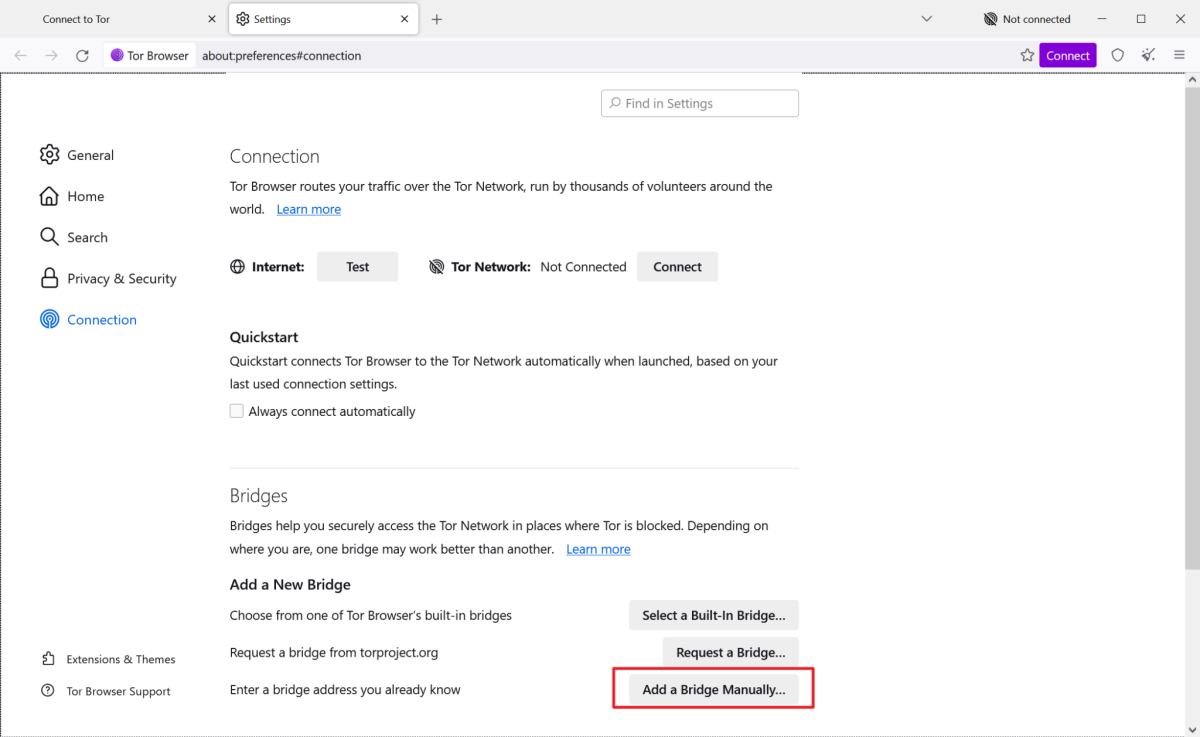
- Go to Tor Browser Settings > Connection.
- Click "Use a bridge."
- Select "Provide a bridge I know."
- Paste the WebTunnel lines you received.
- Click "Connect."
Entity Depth: The Mechanics
What It Is
A pluggable transport that uses domain fronting and TLS re-encryption to hide the initial handshake.
Why It Matters
It defeats TLS Fingerprinting. This is the primary method of blocking Tor in high-censorship countries in 2026.
Strengths
- Stealth: It looks like standard HTTP/S traffic.
- Dual-Purpose: It can tunnel traffic through HTTPS ports (443), which are rarely blocked globally.
Limitations
- Overhead: It adds a slight delay because the data has to be encrypted twice (once for Tor, once for the HTTPS tunnel).
- Configuration: It is not as "plug-and-play" as Snowflake for beginners.
Beginner Suitability
Low to Moderate. While stable, the need to manually request and paste bridge lines makes it slightly more complex than checking a box.
Common Problems & Fixes
Problem: WebTunnel fails with "General Server Error."
Cause: The "front" domain (the website it is mimicking) is blocked or offline in your country. Fix: Request new bridges. The Tor Project rotates the fronted domains. New bridges will use a different, unblocked website as the cover.
Problem: Connection is extremely slow.
Cause: Traffic is being routed through a distant CDN to mimic the target website. Fix: WebTunnel is naturally a bit slower than obfs4. If it is unusable, try obfs4 first to see if you actually need the heavy stealth of WebTunnel. If obfs4 is blocked, you may have to tolerate the lower speed.
Problem: Browser gets stuck at "Connecting" indefinitely.
Cause: Your clock is wrong, or the bridge line was pasted incorrectly. Fix: Check your system clock first. If that is correct, verify you copied the entire bridge line. If you are still stuck, consult our guide on how to fix Tor Browser stuck on connecting for specific troubleshooting steps.
Pro Tips
- Don't mix protocols: If you are pasting WebTunnel bridges, remove any obfs4 or Snowflake bridges from your configuration. Having them all loaded at once can confuse the browser's connection logic.
- Keep it updated: WebTunnel is evolving. The specific parameters in the bridge lines (like the Front domain) change. Use a fresh set of bridges every few months to ensure you are using the latest implementation.
- Use it as a fallback: Try obfs4 first. It is faster. Only switch to WebTunnel if obfs4 is actively blocked (e.g., you see "Retrying handshake" repeatedly). WebTunnel is your "stealth mode," not your daily driver.
Safety & Best Practices
WebTunnel provides exceptional entry-point security, but you must remember the limitations of bridges. A WebTunnel bridge is a private relay. The operator of that bridge can see that someone is using Tor, but they cannot see who you are or what you are doing inside the tunnel.
However, WebTunnel creates a unique trust model: you are trusting the operator to keep the "front" domain safe. If the operator uses a malicious front domain, or if they log traffic, your anonymity could be compromised. Always use WebTunnel bridges provided directly by the Tor Project (via BridgeDB), never from random third parties.
Once connected, you can browse the network safely. Whether you are visiting forums like Dread (check the Dread Forum listing) or searching with the Ahmia search engine, WebTunnel ensures your entry into the network is invisible to your ISP. This allows you to access a verified dark web directory or use tools like Not Evil without fear of immediate disconnection.
Related Guides
- obfs4 vs Snowflake vs WebTunnel
- Working Tor Bridges List 2026
- Why Tor Bridges Stop Working (And How to Fix Them)
- Safe Tor Setup Guide for 2026
- Comprehensive Onion Links Directory
FAQ
Is WebTunnel safer than obfs4? It is safer against detection. obfs4 is safer against speed loss. WebTunnel is the best choice if your firewall actively scans for Tor fingerprints, whereas obfs4 is the best choice if you just need to bypass a simple IP block.
Can I use WebTunnel on mobile? Yes, Tor Browser for Android supports WebTunnel. You can paste the bridge lines into the Android settings just like on the desktop version.
Does WebTunnel hide the fact that I am using Tor? Yes, to a very high degree. To your ISP, it looks like you are visiting a specific website (like a CDN or a news site). It does not look like you are connecting to the Tor network.
Why isn't WebTunnel the default bridge? It is resource-intensive. Because it requires mimicking real websites and using specific CDN domains, it is harder to scale than obfs4. It is kept as an option for users who specifically need it.
Conclusion
WebTunnel represents the next evolution of anti-censorship technology. By abandoning the goal of "scrambling" traffic in favor of "mimicking" it, it provides a level of stealth that obfs4 and Snowflake simply cannot match against modern firewalls. While it requires a bit more setup to request and configure, it is the most powerful tool in the Tor user's arsenal for 2026. When standard bridges fail and the network tightens its grip, WebTunnel is the key that gets you back in.