
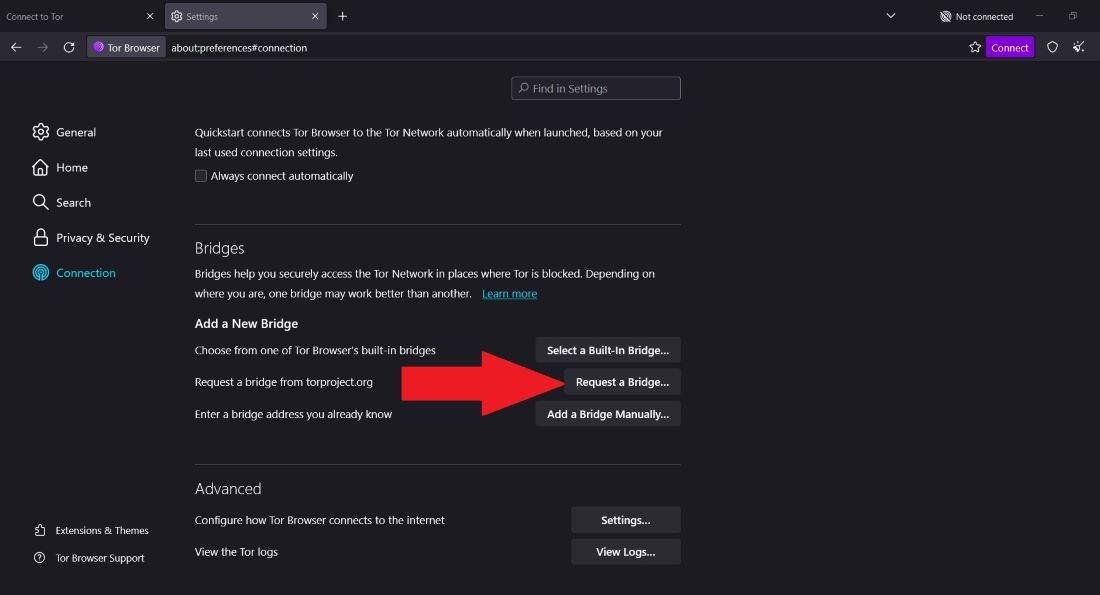
Public bridge lists are often blacklisted within days, making them unreliable for consistent access. To get a working connection in 2026, you need to request private bridges directly from the BridgeDB system. This automated system ensures that bridges are distributed securely and not exposed on public forums. This guide explains the three safe methods to obtain unblocked bridge addresses without exposing your identity to censors.
Quick Answer
To request private bridges, open Tor Browser settings, select "Use a bridge," and click "Request a new bridge from tor-project.org" to solve the Captcha (Moat). If the website is blocked, send a blank email from a Gmail account to bridges@torproject.org with "get transport obfs4" in the subject line to receive a fresh list via email.
What is BridgeDB?
BridgeDB is the software infrastructure managed by the Tor Project that acts as the gatekeeper for unlisted bridges. When standard Tor entry nodes are blocked, BridgeDB hands out private IP addresses that are not publically known. This prevents censors from scraping a single list and blocking everything at once.
Think of BridgeDB as a ticket dispenser. When you request a bridge, it gives you a "ticket" (an IP address and a fingerprint) that allows you to enter the network through a private door. The system is designed to be anonymous: BridgeDB does not know who you are, only that a request was made from a certain IP. If you want to understand more about how Tor works and the concept of onion routing, BridgeDB is the tool that handles the first, critical step of entry when public paths are closed.
Why This Happens (Structured)
Wrong habits
Many users copy-paste bridge addresses from Reddit, Twitter, or forum posts. These public bridges are quickly identified by censorship scripts and blacklisted, rendering them useless for the majority of users.
Outdated tools/info
Older versions of Tor Browser used to request bridges via simple HTTP, which censors could intercept. You need the latest version of the browser to use modern, secure distribution methods like Moat.
Misunderstanding system
Users often assume one bridge line works forever. Bridges are rotated out of the pool if they become compromised or overloaded. Requesting fresh bridges is a necessary maintenance task, not a one-time setup.
External limitations
Some national firewalls block the Tor Project website entirely. If the "Request a Bridge" screen fails to load, it is not because BridgeDB is down, but because your internet provider is blocking the path to the distribution server.
The 3 Safe Methods to Request Private Bridges
You have three distinct ways to get bridges from BridgeDB. The "best" method depends on whether your network allows you to visit the Tor Project website or not.
Method 1: The Moat Tool (Recommended)
Moat is built into the Tor Browser. It uses domain fronting to hide your request to BridgeDB. Instead of looking like you are talking to the Tor Project, it looks like you are talking to a legitimate CDN (like Cloudflare).
How to use it:
- On the Tor Browser connection screen, click Configure.
- Select Tor is censored in my country.
- Select Request a bridge from tor-project.org.
- Solve the Captcha. If successful, BridgeDB will auto-populate the bridge lines in the settings.
Why it works: It hides the intent of your request. The censor sees a connection to a CDN, not to a bridge distributor.
Limitations: Some advanced censors have begun blocking the specific CDN domains that Moat uses. If the screen never loads, Moat is blocked.
Method 2: The Email Method (Most Reliable)
If Moat fails, email is the most robust fallback. BridgeDB listens for emails sent to bridges@torproject.org.
How to use it:
- Create a new email draft (Gmail, Riseup, or ProtonMail work best).
- Subject line: Type get transport obfs4 (or get transport snowflake).
- Body: Leave it completely blank.
- Send.
- Wait 1-5 minutes. You will receive an automated reply containing 3-5 bridge lines.
Why it works: Email providers are rarely blocked globally. Even if the Tor website is down, Gmail is usually accessible.
Limitations: You must trust the email provider not to correlate your request with your identity. Using a burner email address for this purpose is highly recommended.
Method 3: The HTTPS API (Advanced)
For users who cannot use the browser or email, BridgeDB offers a direct HTTP endpoint. This requires a command line tool like curl.
How to use it: Run the command: curl https://bridges.torproject.org/moat/captcha Note: This generates a challenge that must be solved to get the bridges. It is complex and intended for developers or power users.
Why it works: It bypasses the browser interface entirely.
Limitations: If you cannot solve the Captcha programmatically or manually, this method fails.
How to Request and Configure Bridges
Step 1: Access the Request Screen
If you are already stuck at the connection screen, click Configure. If you are already connected, go to the hamburger menu (≡) > Settings > Connection > Bridges.
Step 2: Choose Your Method
Click Request a new bridge from tor-project.org.
- Scenario A: The Captcha loads. -> Solve it.
- Scenario B: It spins forever. -> The site is blocked. Switch to the Email method immediately.
Step 3: Paste the Bridges
If you used the Email method, copy the lines you received. Paste them into the "Provide a bridge I know" text box in the Tor Browser settings. Ensure you copy the entire line, including the fingerprint at the end.
Step 4: Connect
Click Connect. If the browser says "Connecting to relay" but gets stuck, it might be a configuration issue. If you are still experiencing a freeze after adding bridges, our guide on how to fix Tor Browser stuck on connecting can help you troubleshoot specific handshake errors.
Common Problems & Fixes
Problem: The Moat Captcha never loads.
Cause: The CDN domains used by Moat are blocked by your ISP. Fix: Do not wait. Switch to the Email method (bridges@torproject.org). This bypasses the CDN entirely.
Problem: The Email sent to BridgeDB bounces back.
Cause: You are using an email provider that is blocked by the Tor Project (due to spam) or your subject line is malformed. Fix: Use Gmail or ProtonMail. Ensure the subject is exactly get transport obfs4. Do not add extra text or greetings.
Problem: The bridges provided in the email are already blocked.
Cause: You waited too long to use them, or you requested them from an IP pool that is already targeted. Fix: Send the email again with a different transport type, e.g., change the subject to get transport snowflake. This pulls from a different pool of bridges.
Pro Tips
- Request "transport," not specific IPs: When using the email method, ask for a "transport" (obfs4, snowflake) rather than a specific bridge. This tells BridgeDB to give you whatever is currently healthy, rather than a potentially dead address.
- Keep a backup: Once you get working bridges, save them in an encrypted text file (like a KeePassXC entry). If your internet goes down, you can't email BridgeDB. Having a local backup ensures you can reconnect when service is restored.
- Don't mix transports: If you request obfs4 bridges, do not paste Snowflake bridges into the same box. Tor tries to use them one by one, which can slow down the startup. Keep them in separate sets.
Safety & Best Practices
Requesting bridges is safe, but you must be aware of the trust model. BridgeDB knows that someone at your IP address requested Tor bridges. While it doesn't know who you are, it does know that you are trying to access Tor. In most jurisdictions, this is perfectly legal. However, using a VPN to request bridges via email adds an extra layer of separation between you and the request.
Once you are connected, you can use the network safely. If you are looking for specific forums like Dread, verify the address using our Dread Forum listing or check the official link for Dread Forum in 2026. For searching, tools like the Ahmia search engine are reliable; you can check the Ahmia listing to ensure you are on the real site. Always be cautious of downloading files when using new bridges, as your connection is still passing through a single entry point.
Remember that private bridges are a limited resource. Do not request bridges just to have them; only request them when you need to connect, and do not share your personal bridge lines with others. Sharing your private bridge defeats the purpose of it being private and leads to it being blocked for everyone.
Related Guides
- Working Tor Bridges List 2026
- Why Tor Bridges Stop Working (And How to Fix Them)
- Safe Tor Setup Guide for 2026
- Tor vs VPN: Privacy, Anonymity, and Security
- Comprehensive Onion Links Directory
FAQ
How often should I request new bridges? You should request new bridges if you cannot connect after a day of trying. Bridges are refreshed in the pool regularly. Requesting new bridges once a month is a good habit to ensure you always have a valid entry point.
Can I request bridges from my regular Gmail account? Yes, it is generally safe. The Tor Project logs the email but does not store the content. However, if you are extremely privacy-conscious, create a dedicated burner email account solely for Tor correspondence.
Does BridgeDB know my identity? No. BridgeDB does not require a login. It only sees the IP address of the email server or the CDN edge server. If you use Moat or a VPN before emailing, BridgeDB cannot link the request to your real IP address.
What happens if I lose the email with the bridges? You simply need to send another email to bridges@torproject.org. The system is automated and will reply with a new set of lines immediately. You do not need to contact support.
Conclusion
Accessing BridgeDB to request private bridges is the most reliable way to bypass censorship in 2026. By using the Moat tool for ease of access, or the Email method for maximum reliability, you can obtain unblocked entry points that public lists cannot provide. Remember to treat your bridge lines as sensitive data, store them securely, and rotate them if your connection begins to fail. With a fresh set of bridges, the Tor network remains accessible regardless of the restrictions in place.