
Did you know that the visible internet you use every day represents only a tiny fraction of the total data available online? While most people stay on the surface, a growing number of individuals are looking for ways to reclaim their privacy through decentralized networks. Accessing onion sites is not about breaking laws - it is about using tools that protect your identity from trackers and data harvesters. In this guide, you are going to learn how to set up your connection correctly so you can explore the dark web without compromising your personal security. For a comprehensive list of active sites, you can rely on platforms like Onion Links Live to stay updated.
Quick Answer
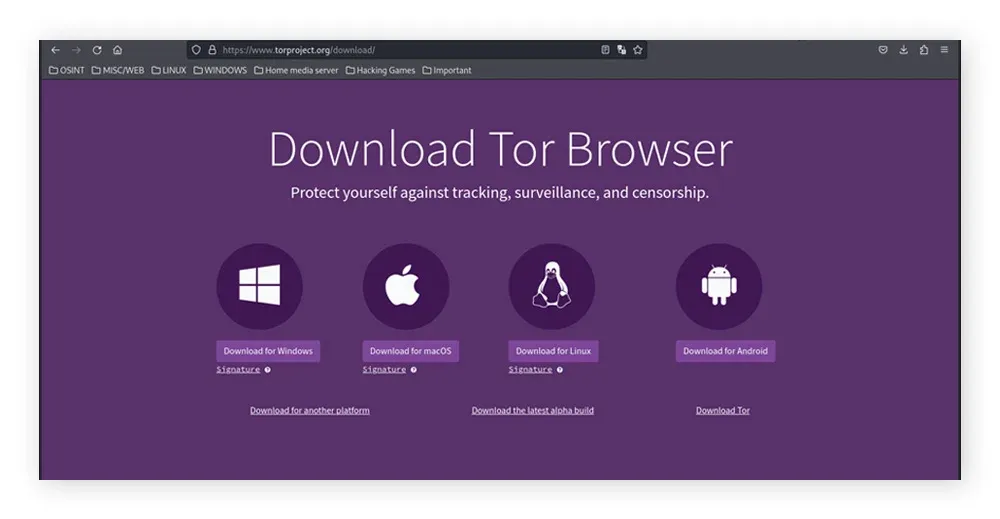
To access onion sites, you must download the official Tor Browser from torproject.org, install it and click "Connect". This specialized browser routes your traffic through three layers of encryption, allowing you to open links ending in .onion which are invisible to standard browsers like Chrome or Safari.
What are Onion Sites? The Basics
Onion sites are parts of the internet that do not appear in Google search results and require specific software to open. They exist on the Tor network, which stands for "The Onion Router". The name comes from the way the system handles your data - it wraps your requests in multiple layers of encryption. When you visit a site, your data jumps through three different volunteer servers around the world. Each server only knows where the data came from and where it goes next but none of them know the full path or the content of your message. If you want a deeper technical understanding of this process, you can read what is Tor and how does it work.
People use these sites for various reasons - Journalists use them to talk to sources safely and activists use them to avoid censorship in countries where the internet is restricted. Many people simply prefer the anonymity it provides. To get started, it is helpful to understand the difference between the deep web and the dark net, as these terms are often confused. The dark web is just a small, encrypted portion of the much larger deep web. You can explore this distinction further by reading about the dark web vs deep web.
Step-by-Step Tor Browser Setup for 2026
Setting up your connection is a straightforward process but you must be careful about where you get your tools. Always download the software from the official source to avoid versions that might contain malicious code. Follow the steps to get online:
- Download: Visit the official Tor Project website and select the version for your operating system (Windows, macOS, Linux or Android).
- Install: Run the installer - On a computer, this usually involves dragging the icon to your applications folder or following a standard setup wizard.
- Configure: Open the browser - If you live in a place where the internet is heavily censored, click "Connection Settings" to use a "Bridge" which helps hide the fact that you are using Tor. Otherwise, simply click "Connect".
- Verify: Once the browser opens, it will tell you if you are successful. You can then navigate to a dark web directory to find valid links.
Once you are connected, your browsing experience will feel slower than usual - this is normal because your data is traveling a much longer distance through multiple encrypted nodes. Patience is part of the process when you prioritize privacy over speed.
Tor Browser vs. Standard Browsers
Why can't you just use Chrome or Firefox to access these sites? The architecture of the Tor Browser is fundamentally different from standard clear web browsers. Understanding these differences is key to maintaining your anonymity.
| Feature | Tor Browser | Standard Browsers (Chrome, Safari, etc.) |
|---|---|---|
| Network Routing | Routes traffic through 3 encrypted relays worldwide. | Direct connection to the server. |
| IP Address | Hides your real IP address from the sites you visit. | Exposes your real IP address to the server. |
| Script Handling | NoScript enabled by default to block active content. | Scripts (JavaScript, Flash) run automatically. |
| DNS Requests | Handles DNS requests through the encrypted tunnel. | DNS requests are often separate and potentially leak data. |
| Access | Can access both .onion sites and standard clear web sites. | Cannot access .onion sites; only clear web sites. |
Safety & Best Practices for Browsing
Privacy is not just about the software you use - it is about how you behave while you are online. Even the best browser cannot protect you if you share your real name or email address on a public forum. You should treat the dark web like a strange city - be observant, stay on well traveled paths and do not trust strangers with your personal information. Using a safe Hidden Wiki 2026 is a good way to find reputable entry points.
Your digital footprint is easy to trace if you are not careful. Avoid using your primary email for any registrations on onion sites. Look into anonymous communication tools. Understanding how PGP encryption works is essential if you plan to send messages to anyone. PGP ensures that only the intended recipient can read your text, even if someone intercepts the message. You can follow this PGP encryption guide to set it up correctly.
Furthermore, true privacy requires a holistic approach. It is not enough to just download the browser; you must learn how to stay anonymous online by managing your digital footprint across all platforms.
Common Mistakes When Accessing Onion Sites
Many beginners fall into traps that make them easy to track - these mistakes are usually the result of bringing habits from the "clear web" into the anonymous space. Those are the most frequent errors individuals make:
Resizing the Browser Window
Maximizing your window allows websites to determine your screen resolution - this helps them "fingerprint" your device. Keep the window at its default size.
Installing Add-ons
Adding extra extensions to the Tor Browser can leak your real IP address. The browser comes pre configured with everything you need for safety.
Using Personal Details
Using the same username you use on social media or your real name is a major security risk.
If you find that a site is not loading, it might be a temporary issue with the server or the link might be dead. You can check a verified onion URL list to ensure you have the correct address. Always double check links, as many fake sites exist to trick users into giving away their credentials.
Pro Tips for Enhanced Privacy
If you want to take your security to the next level, you can change your habits and system settings. Always set your security level in the Tor Browser to "Safer" or "Safest". This disables JavaScript on many sites, which prevents scripts from running without your permission. While this might break some website features, it significantly reduces the risk of a malicious site attacking your computer.
Another tip is to avoid downloading files while you are connected. Files like PDFs or Word documents can contain small pieces of code that connect to the internet outside of the Tor network, revealing your true IP address. If you must download something, disconnect from the internet before opening the file. For more detailed advice, you can consult the DNM Bible, which covers many of the myths and risks associated with dark web navigation. Additionally, before trusting any new marketplace or service, reading a Darknet Desires review can help you determine if it is a scam or a trusted platform.
FAQ
Is it illegal to use the Tor Browser?
In most democratic countries, using the Tor Browser is perfectly legal. It is a tool designed for privacy. What you do with the tool matters - engaging in illegal activities remains against the law regardless of which browser you use.
Do I need a VPN to access onion sites?
You do not need a VPN to use Tor, as Tor provides its own encryption. In some cases, using both can actually make your connection less secure or slower. For most users, a correctly configured Tor Browser is sufficient to stay anonymous.
Why are onion links so long and random?
Onion addresses are actually cryptographic public keys - They are not registered with a central authority like .com domains - this randomness ensures that the address itself is part of the security system that connects you to the correct server.
Can I use Tor on my iPhone?
The Tor Project recommends "Onion Browser" for iOS users, though it is not as secure as the desktop version because of Apple's system limitations. For the best security, using a desktop computer or an Android device is preferred.
Accessing the dark web is a skill that requires a mix of the right tools and a cautious mindset. By following this guide, you have the foundation to navigate onion sites safely in 2026. Remember that privacy is a continuous practice rather than a single setting. Stay updated on new security trends and always verify your sources before clicking on unfamiliar links.