


PGP in 10 Seconds (TL;DR):
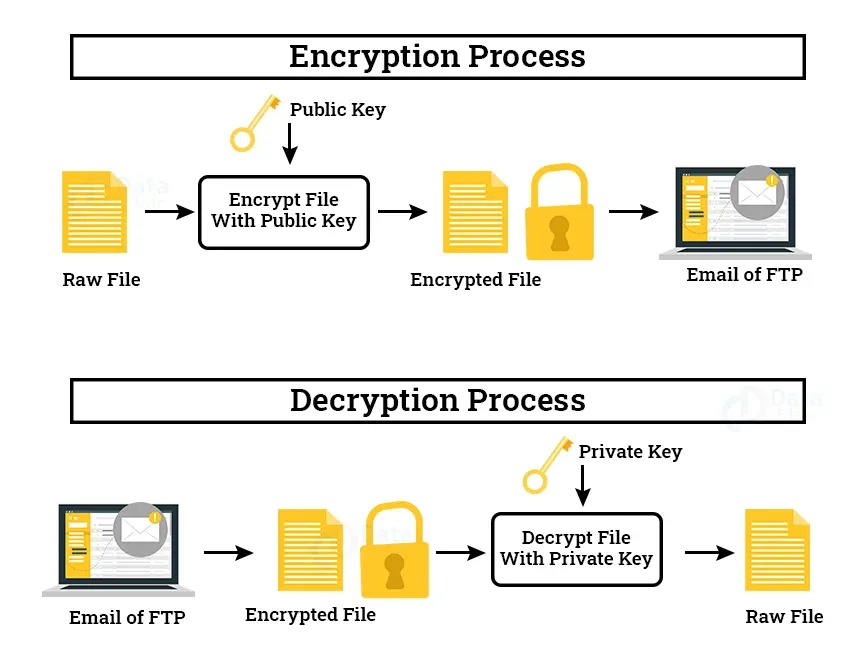
- Uses two mathematically linked keys: a Public Key (to lock data) and a Private Key (to unlock it).
- Encrypts emails, local files, and software signatures.
- Only the intended recipient can decrypt the data.
- Completely decentralized—no central server or authority controls your privacy.
- PGP in 3 Steps: 1. Lock with a public key → 2. Send safely → 3. Unlock with a private key.
In 2026, most data breaches don’t happen because encryption failed—they happen because you never encrypted your data in the first place.
We trust cloud providers, email servers, and messaging apps to secure our most sensitive information. But when those servers are breached, your tax returns, medical records, and confidential business contracts are exposed in plain text.
PGP (Pretty Good Privacy) eliminates this trust gap. It turns your messages and files into unreadable code on your device before they ever reach the internet.
For example, investigative journalists use PGP to receive anonymous leaks securely—ensuring that even if a government or corporation intercepts the email, they only see scrambled gibberish.
PGP at a Glance: How It Compares
Before diving into the mechanics, here is how PGP stacks up against the tools you likely use every day:
| Feature | PGP (OpenPGP) | Signal / WhatsApp | Standard Email (Gmail/Outlook) |
|---|---|---|---|
| Who can read it? | Only the recipient | Only the recipient | The email provider + hackers |
| File Signing | Yes (Verifies software/files) | No | No |
| Trust Model | Decentralized (You hold the keys) | Centralized (Servers hold the keys) | Centralized |
| Best For | Long-term files, emails, verification | Casual daily chatting | Convenience |
What Is PGP Encryption? (Simple Explanation)
Created in 1991 by cryptographer Phil Zimmermann, PGP was originally designed to give ordinary citizens access to military-grade privacy. At the time, the U.S. government classified strong encryption as munitions, making it illegal to export. Zimmermann released it anyway, sparking a historic legal battle that ultimately cemented the public's right to use strong cryptography.
Today, PGP is a foundational cryptographic system designed to:
- Encrypt data so it cannot be read by unauthorized parties.
- Protect communication across insecure networks.
- Verify identity through digital signatures.
If you remember only one thing: PGP doesn’t just hide your data—it mathematically proves who sent it and ensures it hasn’t been altered.
The PGP Ecosystem Map: How It All Connects
PGP is not just one tool; it is a foundational protocol that connects multiple areas of digital security:
- PGP ↔ Email: Integrates with clients (Thunderbird, Outlook) and providers (ProtonMail) for end-to-end encrypted text.
- PGP ↔ Software Verification: Developers sign releases with PGP so your computer can verify the file hasn't been poisoned by hackers.
- PGP ↔ Anonymity Networks: In environments without central authorities (like secure drop boxes for whistleblowers), PGP signatures are the only way to prove a website or person is legitimate.
- PGP ↔ File Storage: Acts as an independent lockbox for local hard drives and cloud storage, ensuring providers cannot read your files.
PGP Keys Explained: Public vs. Private
Every PGP user has two mathematically linked keys. They are connected by a one-way mathematical function: you can easily compute the public key from the private key, but it is computationally impossible to reverse the process.
| Feature | Public Key | Private Key |
|---|---|---|
| Purpose | Used to lock (encrypt) data or verify a signature. | Used to unlock (decrypt) data or create a signature. |
| Sharing | Shared with the entire world openly. | Kept strictly secret; never shared with anyone. |
| Storage | Can be stored on public servers (keyservers). | Stored locally on a secure device or offline USB. |
| Analogy | The open slot on a public mailbox. | The physical key that opens the mailbox. |
You give your Public Key to everyone so they can lock files meant for you. Your Private Key lives on your local computer, protected by a strong passphrase, and is used to unlock those files.
Real Examples: What PGP Actually Looks Like
Beginners often don't know what PGP data looks like. Here are the exact formats you will encounter:
1. What a Fingerprint Looks Like: A short, unique string (usually 40 characters) used to verify identity over a secondary channel.
4A2B 8C9D 0E1F 2A3B 4C5D 6E7F 8A9B 0C1D 2E3F 4A5B
2. What a Public Key Block Looks Like: You copy and paste this entire block into your software to import someone's key.
text
-----BEGIN PGP PUBLIC KEY BLOCK-----
mDMEZh... (Hundreds of lines of random characters) ...jPk=
=ABC1
-----END PGP PUBLIC KEY BLOCK-----
3. What an Encrypted Message Looks Like: Unreadable ciphertext. Only the recipient's private key can turn this back into plain text.
text
-----BEGIN PGP MESSAGE-----
hQIMAwAAAAAAA... (A dense block of scrambled characters) ...qoJ
=XYZ9
-----END PGP MESSAGE-----
Beginner Tip: The next section covers key management. If you just want to understand the basic encryption flow, you can safely skip down to "How Does PGP Work? Step-by-Step for Beginners."
The Complete PGP Key Lifecycle: Creation to Revocation
Managing keys is not a "set it and forget it" process. A true understanding of PGP requires knowing the key lifecycle:
- Creation: Generating the master keypair using true mathematical randomness (often gathered from mouse movements or system entropy).
- Distribution: Uploading the public key to keyservers or sharing it directly.
- Rotation (Subkeys): Advanced users don't use their Master Key for daily tasks. They generate "Subkeys" for encryption and signing. If a subkey is compromised, the Master Key remains safe.
- Expiration: Keys can be set to expire after a certain date (e.g., one year). This forces users to re-confirm the key's validity and limits the damage if a key is lost.
- Revocation: If a key is compromised, you issue a "Revocation Certificate." This is a digital message broadcast to keyservers saying, "Do not trust this key anymore."
How Does PGP Work? Step-by-Step for Beginners
To understand how PGP works, you have to look at its hybrid system. Why hybrid? Because asymmetric encryption (Public/Private key) is incredibly secure but very slow. Symmetric encryption (one shared key) is incredibly fast but has the problem of how to safely share the key. PGP uses both.
text
=========================================================
[ PGP ENCRYPTION FLOW ]
=========================================================
[ PLAIN TEXT MESSAGE ]
|
v
[ 1. COMPRESSION ] -> Shrinks data & hides repeating patterns.
|
v
[ 2. SESSION KEY ] -> Generates a random, one-time symmetric password.
|
v
[ 3. SYMMETRIC ENCRYPTION ] -> Session key rapidly scrambles the message.
|
v
[ 4. ASYMMETRIC ENCRYPTION ] -> The Session Key is locked using the
| recipient's Public Key.
v
[ DIGITAL ENVELOPE ] -> Scrambled message + locked key travel together.
|
v
[ 5. DECRYPTION ] -> Recipient uses Private Key to unlock the Session Key,
which then unlocks the Message.
=========================================================
The Authority Behind PGP: Cryptographic Algorithms
PGP is a framework that uses the world's most trusted cryptographic standards.
Advanced (Optional): The following section breaks down the specific math behind PGP. If you don't care about the difference between RSA and ECC, skip to "How to Use PGP."
RSA vs. ECC: The Asymmetric Battle
For years, RSA (Rivest–Shamir–Adleman) was the default. It relies on the difficulty of factoring massive prime numbers. Breaking a 4096-bit RSA key would take supercomputers millions of years.
However, in modern environments (like smart cards or mobile devices), RSA requires massive key sizes to be secure, which consumes processing power. Enter ECC (Elliptic Curve Cryptography). ECC provides the exact same security as RSA but with exponentially smaller key sizes.
| Security Level | RSA Key Length | ECC Key Length |
|---|---|---|
| 128-bit (Standard) | 3072 bits | 256 bits |
| 192-bit (High) | 7680 bits | 384 bits |
| 256-bit (Top Secret) | 15360 bits | 521 bits |
Symmetric Encryption: AES
No matter if you use RSA or ECC for the key exchange, PGP almost universally uses AES (Advanced Encryption Standard) to scramble the actual bulk data. It is trusted by the U.S. government for top-secret information due to its resistance to all known practical attacks.
The Software: GnuPG (GPG)
The original PGP software became proprietary. Today, most privacy-conscious users rely on GnuPG (GPG)—a free, open-source implementation of the OpenPGP standard. Because GPG is open-source, its code is publicly inspected to ensure it has no hidden backdoors.
The Web of Trust vs. Central Authorities
Advanced (Optional): This section explains PGP's trust model. Feel free to skip if you are solely focused on file encryption.
When you visit a secure website (HTTPS), your browser trusts it because a Certificate Authority (CA) like Let's Encrypt says the site is legitimate. This is a centralized trust model.
PGP uses a decentralized trust model called the Web of Trust. There are no central authorities. Instead, trust is built person-to-person.
- Direct Trust: You personally verify someone's fingerprint (e.g., meeting them in person and checking their ID), and sign their key.
- Transitive Trust: If your trusted friend Alice has signed Bob's key, and you trust Alice's judgment, you might implicitly trust Bob's key.
While the Web of Trust is highly secure against systemic failure, it is often cited as the main reason PGP hasn't gone mainstream—it requires manual effort that average users skip.
How to Use PGP: Beginner Step-by-Step
- Install a PGP tool. Download Gpg4win for Windows. During installation, select "Kleopatra"—the graphical interface that makes PGP usable without coding.
- Generate your key pair. Open Kleopatra, click "New Key Pair," and enter your name and email. (Note: It will ask you to move your mouse randomly to generate true mathematical randomness).
- Share your public key. Right-click your new certificate, click "Export," and save the .asc file. Email this to contacts or upload it to your website.
- Import the recipient’s key. When someone sends you their .asc file, double-click it. Kleopatra adds it to your "keyring."
- Encrypt. Right-click a file, select "Sign/Encrypt," choose the recipient's public key, and click encrypt.
- Decrypt. Double-click an encrypted file you received. Kleopatra will prompt you for your private key's passphrase.
👉 Best PGP Tools for Beginners: Gpg4win, GPG Suite & More
Deep Comparisons: PGP vs. The Alternatives
PGP vs Signal/WhatsApp
- Use PGP for: Encrypting local files, signing software, verifying identities, and long-term, decentralized email security.
- Use Signal for: Casual, daily messaging with friends where you want instant setup and ease of use.
| Feature | PGP (OpenPGP) | Signal / WhatsApp |
|---|---|---|
| Infrastructure | Decentralized (No central server). | Centralized (Relies on company servers). |
| File Signing | Yes (Can sign any file independently). | No (Only secures messages within the app). |
| Metadata | Visible (Subject, sender, receiver). | Partially hidden (Signal hides some metadata). |
PGP vs. S/MIME: The Enterprise Rival
When you hear "encrypted email" in a corporate setting, they are usually using S/MIME, not PGP. Both encrypt email, but they work differently.
| Feature | PGP (OpenPGP) | S/MIME |
|---|---|---|
| Trust Model | Decentralized (Web of Trust). | Centralized (Certificate Authorities). |
| Cost | Free (GPG). | Often requires paid certificates. |
| Ease of Setup | Harder for non-technical users. | Easier if the company manages the CA. |
PGP vs. Full Disk Encryption (BitLocker/FileVault)
Many users confuse file encryption with disk encryption. They serve different purposes.
| Feature | PGP (File Encryption) | Full Disk Encryption (FDE) |
|---|---|---|
| Scope | Encrypts individual files or emails. | Encrypts the entire hard drive. |
| Portability | Highly portable (can email the encrypted file). | Not portable (must unlock the physical drive). |
| Protection | Protects data in transit over the internet. | Protects data at rest if a laptop is stolen. |
Pros and Cons of PGP
✅ Pros
- Extremely strong encryption (RSA/ECC + AES)
- Decentralized architecture (no central authority can be pressured to hand over data)
- Can sign files and verify identity independently
- Battle-tested for over 30 years by global security researchers
❌ Cons
- Steep learning curve for beginners
- Key management risk (lose your key, lose your data forever)
- Does not hide metadata (people can still see who you are emailing)
- The Web of Trust is rarely used by the general public, making verification cumbersome
When NOT to Use PGP
- Casual chats: If you are just messaging friends about dinner plans, PGP is overkill. Use Signal.
- If you forget passwords easily: There is no "forgot password" button. If you lose your private key passphrase, your data is permanently gone.
- Hiding your metadata: PGP encrypts the contents of your email, but not the subject line or who you sent it to. If you need to hide the fact that you are communicating with someone, you need additional tools.
👉 PGP vs VPN: Which actually protects you?
Advanced Threat Models: How PGP Can Be Defeated
Advanced (Optional): Even perfect math can be bypassed by flawed human implementation. Understanding these threats is vital for high-risk users.
- Endpoint Compromise: If a hacker has a keylogger on your computer, PGP will not save you. They will simply log your passphrase as you type it. Defense: Antivirus, endpoint security, and air-gapped machines for highly sensitive keys.
- Traffic Analysis: Even if the contents are encrypted, your ISP can see you are sending large blocks of data to a specific server. Defense: Use Tor or a VPN.
- Historical Vulnerabilities (e.g., Efail): In 2018, researchers revealed "Efail," where poorly configured email clients could be tricked into leaking plaintext. Defense: Always use PGP in "plain text only" modes and keep software updated.
Navigating Anonymity-Focused Environments Safely
In environments without central authorities, users rely heavily on cryptographic verification to avoid impersonation and phishing.
When accessing directories of hidden services, you will often see PGP "fingerprints" listed next to links. These fingerprints allow you to mathematically verify that a site is legitimately operated by the claimed owners, rather than being a spoofed phishing site.
👉 New to anonymity networks? Read our beginner-friendly guide to how the deep web vs dark web actually works.
PGP vs. SSL/TLS: What's the Difference?
| Feature | PGP | SSL/TLS |
|---|---|---|
| Primary Use | Securing specific files, emails, and identity. | Securing the connection between your browser and a website (HTTPS). |
| Key Management | User-managed (You hold the keys). | Managed by Certificate Authorities. |
| Longevity | Encrypted data stays encrypted forever until decrypted. | Encryption happens only during the live connection. |
Common PGP Mistakes to Avoid
- Sharing your private key (never do this under any circumstances)
- Using weak passphrases (use a 20+ character random string generated by a password manager)
- Not backing up your private key to an offline, encrypted USB drive stored in a physical safe
- Failing to verify key fingerprints in person or over a secure video call
- Storing private keys on insecure or shared work devices
Further Privacy Resources
To dive deeper into specific areas of PGP, explore our supporting guides:
- 👉 How to Set Up PGP for Email (Step-by-Step with Screenshots)
- 👉 How to Verify a PGP Signature Safely (Beginner Walkthrough)
- 👉 PGP vs VPN: Which actually protects you?
Frequently Asked Questions
Is PGP legal to use?
Yes, PGP is completely legal in most democratic countries. It is a standard tool for privacy and data protection used by businesses, journalists, and individuals worldwide. However, you should always check your local laws, as a few highly restrictive nations regulate the use of strong encryption.
Can PGP be cracked by hackers?
No. Modern PGP encryption cannot be cracked by brute force. The rare instances of "PGP leaks" happen because a user chose a weak passphrase, had their device compromised by malware, or accidentally leaked their private key—not because the encryption math failed.
Is PGP the same as GPG?
They are essentially the same in practice. PGP is the original proprietary software created by Phil Zimmermann. GPG (GNU Privacy Guard) is a free, open-source implementation that follows the exact same OpenPGP standard.
Do I need an internet connection to use PGP?
No. The cryptographic math happens entirely on your local device. You only need the internet to send the encrypted message or download a new public key.
What happens if I forget my PGP passphrase?
Your Private Key becomes permanently locked, and you lose access to any messages or files encrypted to that key. There is no "reset password" button or backdoor. It is vital to keep your passphrase in a highly secure place.
What is a Revocation Certificate?
It is a digital file generated when you create your keypair. If your private key is ever compromised or lost, you publish this certificate to keyservers. It mathematically invalidates your public key, warning others not to send you encrypted messages.
Final Thoughts: Should You Use PGP?
PGP doesn’t make you invisible—but it puts you back in control.
In an era where default security means trusting corporations with your most private data, PGP shifts the trust back to the mathematics of the keys you hold in your own hands. However, it comes with immense responsibility. Because it is decentralized, there is no customer service to bail you out if you lose your keys.
Use Signal for your daily conversations. Use Full Disk Encryption to protect your laptop from physical theft. But use PGP when the stakes are real—when you need to encrypt sensitive files, verify the integrity of open-source software, or protect highly confidential emails from prying eyes.
If you’re serious about privacy, your next step is setting up your first keypair.