


Most people can’t tell a real onion link from a fake one—and that’s exactly how scams happen.
In 2026, onion addresses are longer, harder to recognize, and easier to fake than ever before.
If you don’t know what a real .onion link looks like, you can’t tell when you’re on a phishing clone.
👉 This guide shows real examples, exact formats, and how to spot fake onion links instantly.
👉 “If you can’t recognize a real onion link in 3 seconds, you’re at risk of landing on a phishing clone.”
Quick Answer: Onion links are long, random-looking URLs that end in “.onion” and are typically 56 characters long (v3 format). They only work in the Tor Browser and are designed to hide both the user’s identity and the website’s location.
Example: duckduckgogg42uxtnv3xy6y5cnihv6adecm3kz677mb257r7db6dsad.onion
⚠️ Why Most Onion Links You Find Are Fake
Before looking at examples, it is vital to understand why the dark web is notoriously dangerous for casual users.
- Public lists are outdated within days.
- Phishing clones copy real sites perfectly.
- One wrong character equals a completely different website.
- Many links are designed specifically to steal login data.
Understanding the onion link format explained is your first line of defense against these fake onion link scams.
What Do Onion Links Look Like? (With Real Examples)
You cannot open these links in Google Chrome, Safari, or Microsoft Edge. Instead, you need the Tor Browser, which routes your connection through three different layers of encryption.
Because the system is decentralized, the addresses do not look like the catchy, branded names you see on the surface web. They are long, complex, and intentionally difficult to memorize.
Onion Link Format Explained (v3 Structure)
Onion links are fundamentally different from the web addresses you use every day. A standard URL uses the Domain Name System (DNS) to translate a name into an IP address. Onion addresses do not use DNS. They are cryptographic keys that tell the Tor network how to find a specific hidden service.
These addresses are technically known as "Version 3" onion services. When discussing v3 onion address length, you will always see a long string of 56 characters consisting of lowercase letters and numbers from 2 to 7. Earlier versions were only 16 characters, but they are now obsolete and insecure. If you find a short link, it is likely a dead or dangerous service.
The "dot onion" suffix is a top-level domain that only exists within the Tor network. It is not registered with any central authority, meaning no one can take down a site by complaining to a registrar. view active onion links
🔍 Real vs Fake Onion Links (Quick Comparison)
To help you understand how to verify onion links, here is a breakdown of how legitimate sites compare to malicious ones:
Length:
- Real = 56 characters (v3)
- Fake = Shorter or slightly altered
Source:
- Real = Verified directories or official pages
- Fake = Random forums, emails, DMs
Behavior:
- Real = Loads normally in Tor
- Fake = Asks for login immediately
URL Pattern:
- Real = Random but consistent
- Fake = Typos or swapped characters
7 Real Onion Link Examples
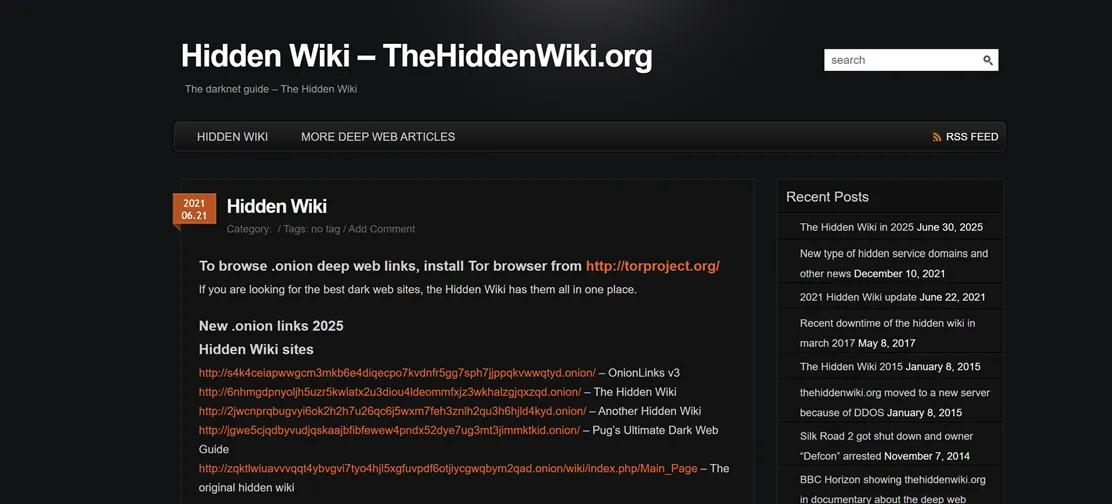
Looking at a real onion links example helps you recognize the format when you browse. While the characters seem random, some services use "vanity" addresses where the first few letters spell out a recognizable word. This requires immense computing power to generate.
- The New York Times: https://www.nytimes3xbfgragh.onion/ (Note - This is an older V2 style; modern ones are much longer).
- Facebook: facebookwkhpilba.onion (The official Tor mirror for the social media giant).
- DuckDuckGo: https://duckduckgogg42uxtnv3xy6y5cnihv6adecm3kz677mb257r7db6dsad.onion/
- ProtonMail: https://protonmvpms5qhrv7u3sl6is647y32y77mvmcnv24vuzn6f3fpeutnyqd.onion/
- The Hidden Wiki: A popular starting point for new users to find various service categories.
- Torch Search: One of the oldest search engines available inside the network.
- Riseup: A communication tool used by activists and journalists for secure messaging.
As you can see, official mirrors are just as complex. Always copy and paste these addresses. One wrong character will lead to a "Site Not Found" error or a malicious copycat site designed to steal your data.
How to Spot Fake Onion Links (Avoid Scams)
Bad actors frequently create "phishing" sites that look exactly like the real thing. They might change just one or two characters in a 56-character string. Because the strings are so long, your brain often skips over the middle part—which is exactly where the trick happens.
Fake links often appear in public forums or unsolicited emails. If a link promises something too good to be true, it is probably a trap. These sites often use "URL shorteners" to hide the actual address. Never click a shortened link within the Tor network unless you absolutely trust the sender.
Red flags to watch for:
- The URL is only 16 characters long (outdated and insecure).
- The site asks for your login details before showing you any content.
- The address comes from a random chat room or an unverified social media post.
Are Onion Links Safe to Use?
Your safety depends more on your behavior than the technology itself. Even though the Tor network is secure, you can still give away your identity if you are not careful. You should never use your real name, email, or any username that you use on the "clear web".
Always keep the Tor Browser updated to the latest version. Leave the browser window at its default size—maximizing it tells a website your screen resolution, which helps companies "fingerprint" and identify you. Finally, turn off JavaScript for the highest level of security, as malicious scripts can break out of the browser's sandbox to access your files.
Where to Find Verified Onion Links
Since Google does not crawl the dark web, you need a different way to find content. The most common method is using well-known and trusted sources. These lists are maintained by community members who check the links to ensure they are active and safe.
👉 The safest way to find real onion links is through official sources or well-established directories—not random lists or social media posts.
You can also use specialized search engines. Compared to standard engines, these do not track your history, but they are less efficient and often return dead links. Always cross-reference any link you find with a trusted directory to ensure you are going to the right place.
Persistence is key when exploring. You will find that many sites are slow or occasionally unavailable. This is normal because the traffic bounces through servers around the world. If a link does not work the first time, wait a few minutes and try again.
❓ How Do You Verify a Real Onion Link?
To verify an onion link is real:
- Check it against multiple trusted sources
- Look for official announcements or signed messages
- Avoid clicking links from random forums or DMs
- Never trust shortened URLs
FAQ
Are onion links illegal to click on? Simply clicking on an onion link is not illegal in most countries. The Tor Browser is a legitimate tool used by journalists, activists, and privacy-conscious citizens. Accessing illegal content or engaging in prohibited transactions is still against the law.
Why are onion links so slow? Your data travels through at least three different volunteer-run servers (nodes) located around the world. Each step adds delay. The encryption layers take time to wrap and unwrap—this slow speed is the trade-off for anonymity.
Can I open an onion link on my phone? Yes. There is an official Tor Browser app for Android. For iOS users, the "Onion Browser" is the recommended alternative, though it has some limitations due to Apple's operating system rules. Always use official versions to avoid fake apps.
Do I need a VPN to use onion links? You do not strictly need a VPN to use Tor, as the network itself provides encryption. Some people use a VPN to hide the fact that they are using Tor from their Internet Service Provider. If you choose to use both, connect to your VPN first.
🔑 Final Takeaway
Onion links are not meant to be easy to read—they are designed for security, not convenience.
If you cannot recognize the structure of a real onion link, you are relying on trust in a space where trust does not exist.
👉 Always verify before you click—because one wrong character can lead to a completely different site.