
Did you know that the most popular social platform for anonymous users is not on the normal internet but hidden deep inside the Tor network? If you are looking for honest reviews of darknet services or need to stay updated on privacy tech, you are likely searching for Dread. You are not alone in your curiosity - thousands of people daily seek a reliable way to communicate without big tech companies watching their every move.
Navigating this space is tricky because fake links are everywhere. One wrong click can lead to a phishing site designed to steal your cryptocurrency or infect your device with malware. But this guide changes that. We will show you exactly how to find the real forum, verify its authenticity, and use it without compromising your identity. To understand the environment you are entering, it helps to first understand the dark web vs deep web vs clearnet distinctions.
⚡ QUICK ANSWER
Dread Forum is the main discussion hub on the dark web, acting like an anonymous version of Reddit. It stays relevant because it is the primary place where users can verify links and report scams in real time. To use it safely, you must use the Tor browser and a verified onion link to avoid phishing sites. Many users looking for the current dread onion link may 2026 often find that links change frequently due to security measures.
What is Dread Forum?
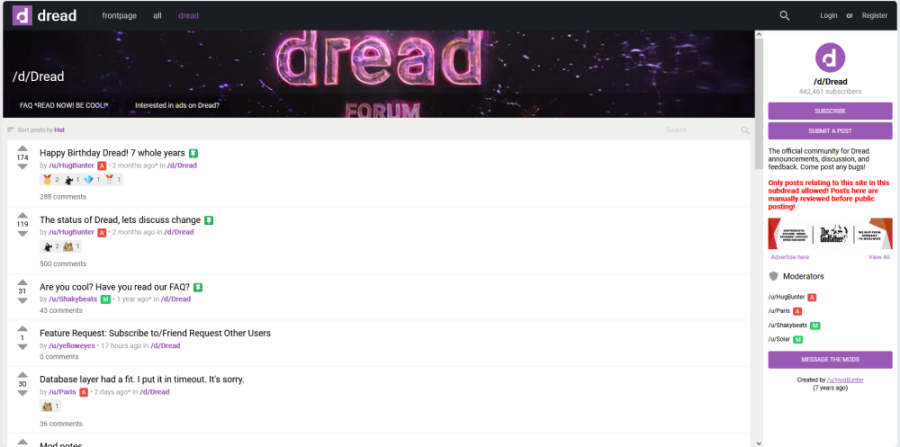
Dread is a massive community-driven website that exists on the darknet. It serves as the "front page" of the hidden internet, much like Reddit does for the clearnet. People use it to talk about things they cannot discuss on mainstream social media due to censorship, privacy concerns, or the controversial nature of the topics. If you are wondering what is the dark web, Dread is essentially its town square.
The forum functions almost exactly like Reddit, where users post threads and others reply with comments. You will find sub-communities, often called "Subdreads," dedicated to everything from privacy software and cryptography to reviews of active darknet markets.
The site is a vital tool for the community because it hosts groups like the "Darknet Market Avengers"—teams of volunteers who test products (such as drugs or digital goods) for purity and safety. It is a place where information is the primary currency. Since most of the dark web is full of scams and exit scams, Dread serves as the "police" or the "truth-checker" for the hidden web. Without Dread, navigating the darknet markets would be nearly impossible for the average user.
How Dread Works
Dread operates on a decentralized philosophy, even though it has a central admin team (known as Paris and HugBunter). The platform is built to resist censorship and data harvesting. Many users utilize best dark web monitoring tools to keep track of forum uptime and reputation scores.
The Registration Process Unlike Facebook or Twitter, users create accounts without providing an email address, phone number, or any personal information. You simply choose a username and a password. This ensures your identity stays private from the moment you join.
The Karma System The forum uses a "karmic" system similar to Reddit. When you post helpful information, other users give you "upvotes" (often called "Hugz" on Dread). This builds your reputation within the community. High-reputation users are often seen as more trustworthy sources of information.
Under the Hood Because the site is text-heavy and lacks the bloat of modern web apps (no auto-playing videos or high-res ads), it loads quickly even on the slow Tor network. It uses specialized software to mitigate DDoS attacks, which is why you might need to check the dread forum down status if the site won't load.
Official Dread Onion Link (2026)
Finding the real link is the most critical step for any user. Because Dread is so popular, hackers create hundreds of fake "phishing" mirrors every week. These fake sites look pixel-perfectly identical to the real forum but are designed to steal your login credentials or spread malware. You should never trust a link found on a random clearweb search engine like Google.
Users are constantly searching for the dread forum onion link 2026 or the dread official onion link 2026. However, because the site is under constant threat, the current working dread onion link 2026 may rotate. The dread onion link working 2026 is typically a long string of characters ending in .onion.
It is vital to verify you have the current dread onion address 2026 and not an old, decommissioned URL. If you find a dread onion link current 2026 on a random blog, be skeptical. The dread dark web forum current onion link 2026 should always be verified against multiple trusted sources. Many users keep a backup of the current dread forum onion address 2026 or the dread forum current onion link 2026 saved offline for safety.
If you are asking how to access dread forum onion link 2026, the process requires specific tools. Always ensure you are using the dread forum official onion link 2026 found on a trusted dark web directory. The dread .onion address 2026 is your gateway to the community. You can check our specific Dread Forum listing page for the most up-to-date status and verified mirrors.
Dread Forum Status (May 2026)
Many users searching for the current dread onion link May 2026 are trying to confirm whether the forum is online or under maintenance. Because Dread frequently rotates mirrors and faces DDoS attacks, uptime can fluctuate throughout the week.
The dread darknet forum status 2026 may show:
- Online and fully accessible
- Slow due to high Tor traffic
- Captcha protection mode enabled
- Temporary maintenance downtime
- Mirror rotation because of phishing attacks
Before logging in, always verify the current dread forum onion address 2026 through trusted sources and compare multiple mirrors to avoid phishing clones. If you are struggling to find a live Dread forum mirror or an active Dread onion address, checking a verified Dread URL on a trusted directory is the safest bet. An updated Dread onion site is essential for secure access.
How to Verify Darknet Links on Dread
To ensure you are in the right place, you should cross-reference links from trusted directories. Many users start by checking dark web search engines tested that are known for filtering out fake mirrors.
- Check the URL: Ensure the onion address matches the one listed on trusted sources. Be aware of the differences between v2 vs v3 onion links to ensure you are using a modern, secure address format.
- Check the Canary: Always check the site's PGP signature or the "canary." A canary is a signed message that proves the administrator is still in control of the domain and has not been compromised by law enforcement.
- The Captcha Test: Real Dread links will almost always force you to solve a complex captcha before entering. If a site lets you in without one, be suspicious. This is a common tactic used by a phishing onion site.
What Are Subdreads on Dread
To keep the massive site organized, users rely on "Subdreads." These function exactly like subreddits—dedicated boards for specific topics. Given the sheer volume of traffic on Dread, browsing the main page without filtering can be overwhelming.
Subdreads cover a vast range of subjects, including:
- Market Reviews: Detailed discussions on current darknet markets, vendor reliability, and shipping times.
- Cryptocurrency: Guides on mixing coins (Monero, Bitcoin), securing wallets, and avoiding blockchain analysis.
- OpSec (Operational Security): Technical advice on how to stay anonymous online and avoid arrest. Following a dark web safety guide is recommended before engaging here.
- Fraud & Watchdogs: Communities dedicated to calling out scammers and tracking exit scams.
- Search Engines: Discussions about DuckDuckGo Onion and other privacy tools.
Subdreads help you filter out noise and focus strictly on the user discussions or technical help you actually need. Each has its own moderators and rules, so reading the sidebar of a Subdread before posting is essential etiquette. For finding other communities, users often refer to the Hidden Wiki 2026.
How to Access Dread Forum Safely in 2026
Accessing the forum is easy if you have the right tools. However, simply clicking a link is not enough in 2026. You need a "Privacy Stack" to ensure your anonymity remains intact. Follow these steps to get inside safely.
Step 1: Download Tor
You cannot use Chrome, Safari, or Firefox. These browsers will not be able to resolve the .onion address, and they leak data like DNS requests. Go to the official Tor Project website and download the Tor Browser. You can read more about what is tor to understand why this specific browser is required.
Step 2: Connect to a VPN (Optional but Recommended)
Before opening Tor, some users turn on a premium VPN. This adds an extra layer of privacy by hiding the fact that you are using Tor from your internet provider. In countries where Tor usage is monitored or flagged, a VPN is essential.
Best VPN for Dread Reddit: When users ask for recommendations, the answer is always a premium, no-logs provider. Avoid free VPNs, as they often track and sell your data. Look for features like a Kill Switch and RAM-only servers. If connection issues arise, check our guide on the best Tor bridges 2026.
Step 3: Configure Your Security
Open the Tor Browser settings. Set the "Security Level" to "Safest." This will disable JavaScript and other potentially executable code. While this might make the site look plain, it protects you from zero-day exploits.
Step 4: Enter the Onion Address
Copy the official Dread onion link and paste it into the Tor URL bar. Wait patiently, as onion sites take much longer to load than regular websites. If it times out, wait a minute and refresh.
Step 5: Complete the Captcha
Dread uses very difficult captchas to stop bot attacks. You may need to solve multiple images or text puzzles before the site lets you in. This is a good sign—it means the site is actively working to protect itself.
Common Mistakes Using Dark Web Forums
New users often compromise their anonymity by making simple, avoidable errors. Here are the most common mistakes using dark web forums:
- Trusting Clearnet Search Results: Searching for the link on Google is the fastest way to find a phishing site. Fix: Only use links from a trusted dark web safety guide or the official forum sidebar.
- Reusing Clearweb Usernames: Bringing a username from Reddit or Twitter makes it easy for investigators to track your real identity across the web. Fix: Create a completely unique username that you have never used on the normal internet.
- Downloading Attached Files: Malicious actors often hide keyloggers or malware in shared files. Fix: Avoid downloading .exe, .pdf, or .zip files from strangers on Dread or similar communities.
- Ignoring the Private Key: If you lose your password without saving your private key, your account is gone forever with no reset option. Fix: Write down your private key on paper and store it in a safe place immediately after registering.
Is Visiting Dread Forum Illegal?
No, simply visiting a forum to read discussions is generally not illegal. Dread is a platform for free speech and privacy education. In most Western jurisdictions, accessing the Tor network and browsing hidden websites is perfectly legal.
However, the nuance lies in usage. While reading is legal, engaging in illegal transactions found via the forum can lead to severe legal trouble depending on your local laws. Furthermore, in some restrictive countries, simply using the Tor browser or attempting to bypass censorship can attract attention from authorities. You are responsible for your own actions on the site.
Why Dread Goes Offline Sometimes
If you try to visit Dread and find the page won't load, don't panic—this is a common occurrence. Dread is under constant attack from various entities. There are three main reasons why the site disappears:
- DDoS Attacks: Rival groups or bored hackers often flood the site with massive amounts of traffic to knock it offline. Dread uses advanced anti-DDoS shields, but sometimes the volume is too high.
- Server Maintenance: The admins frequently update the site to improve security, patch vulnerabilities, or add new features. During these updates, the server is taken offline temporarily.
- Tor Network Issues: Sometimes the problem is not the site itself but the Tor network. Tor nodes can go down, or global instability in the network can make sites unreachable.
❌ WHY THIS HAPPENS
- Outdated Links: You are likely using an old onion address that is no longer in service.
- High Traffic: The servers are overwhelmed by too many users accessing the site simultaneously.
- Security Shields: The site might be in "private mode" to block an ongoing DDoS attack, blocking legitimate traffic temporarily.
- Browser Errors: Your Tor settings might be blocking the Javascript or cookies required for the site to function properly.
How to Fix Dread Captcha Failing
Dread uses very difficult captchas to stop bots. If the captcha keeps failing even though you are typing it right, your connection might be flagged as suspicious.
- Step 1: Refresh your Tor identity. Click the onion icon in the browser and select "New Tor Circuit for this Site." This gives you a new IP address.
- Step 2: Clear your cookies for the site in the privacy settings.
- Step 3: If the captcha won't load at all, you may need to lower your Security Level from "Safest" to "Safer" temporarily, solve the captcha, and then raise it back up.
Features of Dread Forum
The forum is more than just a message board—it is a suite of tools for the anonymous user.
Private Messaging You can send encrypted messages to other users without a middleman. However, be cautious, as PGP encryption is recommended for sensitive communications.
Subdreads Organized categories for specific topics like "OpSec" or "Reviews," allowing users to curate their feed.
Verification System Trusted vendors and developers can get "Verified" badges to prove they are legitimate. This helps users avoid scammers posing as well-known sellers.
Dead Drop A unique feature used to share sensitive text snippets that disappear after being read. This is useful for sharing temporary codes or sensitive information without leaving a permanent record.
Dread Forum vs The Hub Comparison
Dread is often compared to older forums like The Hub. While both serve the darknet community, they have distinct differences. Below is a detailed Dread forum vs The Hub comparison.
| Feature | Dread Forum | The Hub |
|---|---|---|
| Primary Focus | General discussion, market reviews, news | Education, security, long-form tutorials |
| UI/UX | Similar to Reddit (Threaded) | Traditional Forum (VBulletin style) |
| Moderation Level | High (Active community policing) | Medium (More hands-off admin) |
| Best For | Breaking news, vendor verification, chatting | Learning technical skills, reading guides |
| Popularity | Highest (Thousands of active users) | Lower (Niche technical audience) |
Dread vs Other Anonymous Forums
- Endchan: An anonymous imageboard that is less moderated than Dread. It allows for image posting but can be chaotic and filled with spam.
- Pitch: A newer forum that is gaining popularity for its clean design, but it lacks the massive user base that Dread has.
Compared to many deep web vs darknet communities that focus only on tech, Dread is a social hub. It feels like a real community where people share stories and help each other avoid common pitfalls of the anonymous web.
Best Alternatives to Dread
If Dread is down, you might want to look at these other options:
- The Hub: As mentioned, this is the go-to for long-form educational content. If you want to read a 5,000-word guide on PGP encryption, go here.
- Endchan: Good for quick, image-based discussions where anonymity is prioritized over quality.
- 8kun (formerly 8chan): A fringe imageboard that hosts various political and tech discussions, though it is often plagued by extreme content and instability.
Risks of Using Dark Web Forums
You must be aware that the dark web is not a playground. Even on a moderated site like Dread, risks exist.
- Phishing: Using the wrong link will result in your account being stolen. Always verify the URL.
- Social Engineering: People may try to befriend you to manipulate you into stealing your crypto or personal details. Remember, everyone is a stranger.
- Malware: Never click on external links that lead to file downloads (.exe or .pdf) unless you absolutely trust the source and are running inside a sandbox or virtual machine.
While administrators work hard to remove bad actors using advanced monitoring tools, you are ultimately responsible for your own digital safety.
Trusted Sources & Security References
To further your understanding of the technologies that keep you safe, we recommend referencing these authoritative sources and projects:
- The Tor Project: The official developers of the Tor Browser and network.
- Electronic Frontier Foundation (EFF): A leading nonprofit defending civil liberties in the digital world.
- Tails OS Documentation: A portable operating system that protects against surveillance and censorship.
- SecureDrop: An open-source whistleblower submission system that media organizations use to securely accept documents from anonymous sources.
- Tor Onion Services Documentation: Technical specifications on how .onion addresses work.
⚠️ COMMON PROBLEMS & FIXES
| Problem | Fix |
|---|---|
| The Captcha keeps failing even though I am right. | Refresh your Tor identity to get a new IP address and try again. Also, ensure your browser clock is set to automatic time. |
| The site says "Onion Site Not Found" | This means the link is dead or the server is down. Check a trusted link directory for a mirror or wait a few hours. |
| I forgot my password and there is no "Reset" button. | There is no way to recover an account. You must create a new one and remember to save your private key this time. |
| The site loads extremely slowly. | This is normal for Tor. Ensure no other bandwidth-heavy apps are running. If it's stuck, try a "New Circuit". |
| I can't post or comment. | New accounts often have restrictions. You must build up "karma" by participating and getting upvotes before you can post freely. |
💡 PRO TIPS
- Turn off JavaScript: Always keep JavaScript disabled in your Tor settings if you want maximum security. Only enable it if a site absolutely requires it to function.
- Unique Username: Use a unique username that you have never used on the clearweb. Do not use your gaming handle or your Reddit name.
- Save the Master Mirror: Save the official "Master Mirror" list locally on a USB drive so you always have a backup link even if the clearnet listing goes down.
❓ FAQ
Is Dread Forum illegal to visit? No, visiting a forum to read discussions is generally not illegal. Engaging in the sale of illegal goods or services found via the forum can lead to legal trouble. Always check your local laws before participating.
How do I know if a Dread link is real? You should only get links from verified sources like the sidebar of the forum itself or trusted directories. Real links will always require a complex captcha and will never ask for your email address.
Do I need a VPN to use Dread? While Tor provides anonymity, a VPN hides the fact that you are using Tor. This is useful if you live in a country where using the Tor browser is flagged by authorities. It is an extra layer of protection.
Why is the site so slow? Tor routes your connection through three different servers around the world. This process takes time. Dread often faces DDoS attacks which slow down the response time of the main server.
What happens if I lose my password? There is no "reset" button. If you lose your password and did not save your private key, the account is gone forever and you must create a new one.
What is the current Dread onion link? The current dread onion link 2026 changes periodically to maintain security. Always verify the link through a trusted dark web directory to ensure you are not accessing a phishing onion site.
✅ Conclusion
In conclusion, Dread Forum remains the most important site for anyone navigating the darknet in 2026. It provides a necessary space for truth and community in an environment often filled with lies. By using the official link, following a strict dark web safety guide, and adhering to basic safety rules, you can join the conversation and learn how to protect your digital life. Stay safe and always double check your links!
Related Guides & Further Reading
- Access Onion Sites 2026: Safe Tor Setup Guide
- DuckDuckGo vs Google Privacy 2026
- Hidden Wiki 2026: Safe Onion Links Guide
- Top Dark Web Search Engines 2026
- Not Evil Tor Search Engine
- Not Evil Onion Link 2026
- Not Evil Search Engine Working Link Access Guide 2026
- Ahmia Onion Link 2026: Official Verified URL
- DuckDuckGo Onion Tor Network Guide 2026
- Top 10 Dark Web Forums & Communities for Privacy