


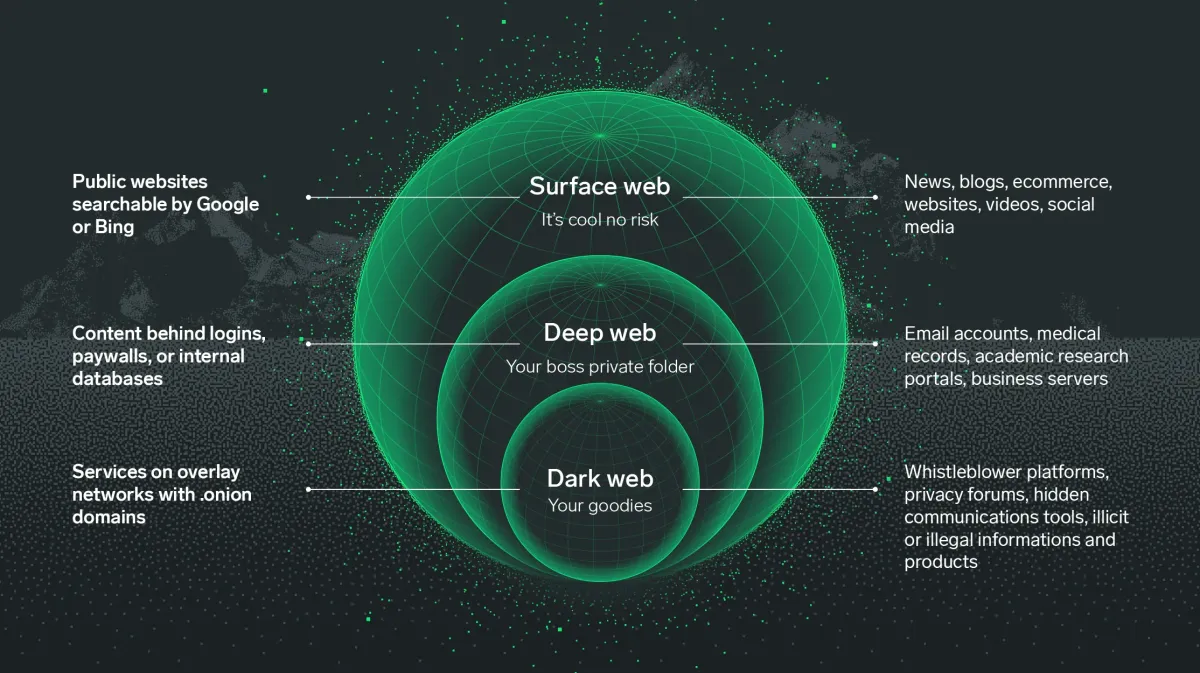
Did you know that the "surface web" you use every day, including Google and social media, makes up less than 5 % of the total internet? You are likely curious about what sits in the remaining 95 %, often hidden behind layers of encryption. If you feel a bit lost or intimidated by the terminology, you are not alone - most people find the concept of unindexed networks confusing at first. The reason this space seems so mysterious is simply because standard browsers cannot see it. In this guide, you will learn exactly how to navigate this hidden layer, understand the reality of onion sites and discover why privacy conscious individuals use these tools to this day.
To truly understand the scale of this hidden ecosystem, we must look back at the evolution of internet architecture. The internet was originally designed as an open, decentralized network to share information freely. However, as commercialization took hold in the 1990s, the need for indexing led to the creation of the "Surface Web." Everything else—unindexed databases, private networks, and encrypted layers—was pushed into the background. By 2026, the sheer volume of data generated by IoT devices, private corporate servers, and decentralized networks has made the Deep Web exponentially larger than the Surface Web, with the Dark Web serving as its most secure, deliberate subset.
Quick Answer
The Dark Web is a subset of the internet that requires specific software, like the Tor Browser, to access. It is used for privacy and anonymity because it masks your IP address and encrypts your traffic. To stay safe, you must use verified links and avoid sharing any personal details.
What Is the Dark Web?
The Dark Web is a collection of websites that exist on an encrypted network and cannot be found by traditional search engines. Compared to the "Deep Web" which includes private things like your email inbox or banking portal, the darknet is built specifically for anonymity. It functions through a process called "onion routing" where your data travels through multiple different servers around the world, peeling away layers of encryption at each stop.
People use this space for many reasons - Journalists use it to talk to sources without being tracked and people living under strict governments use it to bypass censorship. You might also find specialized Dark Web directories that categorize content that is otherwise invisible. It is a tool for anyone who needs a higher level of digital privacy than a standard browser provides.
How Onion Routing Actually Works (The Technical Deep Dive)
To appreciate why the Dark Web is secure, you must understand the mechanics of onion routing. When you type a URL into a standard browser, your computer sends a direct request to a server, exposing your IP address, location, and the content of your request to your Internet Service Provider (ISP) and the destination server.
Onion routing disrupts this direct line of communication. When you access an .onion site using the Tor Browser, your data is encrypted multiple times—like the layers of an onion.
- The Entry (Guard) Node: Your encrypted data is first sent to a "Guard" node. This node knows your real IP address but cannot read your encrypted data or know where you are going.
- The Middle Node: The Guard node peels off the first layer of encryption and passes the data to a Middle node. This node knows which node sent the data and which node receives it next, but it doesn't know your IP address or the final destination.
- The Exit Node: The final layer of encryption is removed by the Exit node, which then sends your request to the .onion site. The Exit node knows what you are requesting but has no idea who you are.
By the time your request reaches the destination, it is nearly impossible for any single entity to connect your identity to the action. By 2026, advancements in Tor's protocol have made these circuits even more resilient against traffic analysis attacks used by state-level actors.
Comparing the Layers of the Internet
A common point of confusion is mixing up the Deep Web and the Dark Web. Here is a comprehensive comparison to clarify the distinctions.
| Feature | Surface Web | Deep Web | Dark Web |
|---|---|---|---|
| Accessibility | Publicly accessible to anyone with an internet connection. | Requires specific permissions, logins, or authentication. | Requires specialized software (Tor, I2P, Freenet). |
| Indexing | Fully indexed by Google, Bing, and other search engines. | Not indexed by standard search engines. | Intentionally hidden and not indexed. |
| Content Examples | News sites, public social media, blogs, Wikipedia. | Online banking, email inboxes, private corporate databases, medical records. | Anonymous forums, hidden marketplaces, whistleblowing platforms. |
| Security Level | Standard HTTP/HTTPS protocols. Relies on website security. | Protected by firewalls and passwords. | End-to-end encryption, onion routing, anonymity by design. |
| Anonymity | None. Your IP address and location are logged by servers and ISPs. | Pseudonymity. Your identity is tied to your account (e.g., your bank knows who you are). | High anonymity. IP addresses are masked, and identities are protected by cryptography. |
| Size relative to total Internet | ~4% to 5% | ~90% to 95% | ~less than 1% (A tiny fraction of the Deep Web) |
Real Use Cases in 2026
The title of this guide promises real use cases, and it is vital to separate the Hollywood myth from reality. While illicit activities exist, the Dark Web is primarily a sanctuary for privacy.
1. Investigative Journalism & Whistleblowing Platforms like SecureDrop (which many major news organizations still use in 2026) rely on the Tor network. They allow sources to leak documents regarding corporate corruption or government surveillance without fear of reprisal. The encryption ensures that not even the news organization knows the source's IP address until the source voluntarily reveals it.
2. Anti-Censorship & Bypassing Geoblocks In 2026, internet censorship in various parts of the world has become highly sophisticated, utilizing deep packet inspection (DPI) and AI-driven filtering. Citizens in heavily restricted regions use the Dark Web not just to access blocked news, but to communicate with the outside world. Tools like Tor Bridges (obfuscated entry points) are specifically designed to evade these national firewalls.
3. Privacy-Conscious Computing With the rise of hyper-targeted advertising and data brokering, many everyday users are turning to the Dark Web simply to read news or research topics without being added to algorithmic profiles. It is the digital equivalent of reading a book in a private room rather than in a glass-walled public square.
4. Cybersecurity Research Security professionals constantly monitor Dark Web forums to detect zero-day vulnerabilities before malicious actors can exploit them. They track "Initial Access Brokers" (who sell stolen credentials) to warn businesses of impending breaches.
5. The Illicit Economy It would be dishonest to ignore that the Dark Web hosts black markets for contraband, stolen data, and fraudulent documents. However, by 2026, the landscape has shifted. Law enforcement has become highly adept at infiltrating these markets, leading to a rise in "Scam Markets" where administrators steal users' cryptocurrency rather than actually delivering goods. This makes the illicit Dark Web significantly more dangerous for criminals than it was a decade ago.
Why Dark Web Access Often Fails
Accessing this part of the web is not always as simple as clicking a link. You might face multiple hurdles when you first try to connect.
- Wrong habits Using your real name, email or standard passwords makes the privacy of the network useless.
- Outdated tools Trying to open .onion links in Chrome or Safari will result in an error message every time.
- Misunderstanding links Many users do not know what onion links look like and accidentally click on dead or fake URLs.
- Speed limitations Because your data bounces through multiple global nodes, the connection is significantly slower than your normal internet speed.
The 2026 ISP Landscape
By 2026, Internet Service Providers have deployed advanced AI algorithms that can identify Tor traffic patterns with high accuracy, even if they cannot read the payload. This has led to "algorithmic throttling," where your connection speed is artificially reduced the moment you connect to the Tor network, making access feel like using dial-up internet from the 1990s. This is often why access "fails" or times out—the connection is choked before it can establish a stable circuit.
Common Dark Web Mistakes
1 - Using Personal Identifiers
Many beginners log into their personal accounts while using the Tor network - this links your hidden identity to your real identity immediately.
Fix Create entirely new, anonymous aliases and use encrypted email services for any registrations.
2 - Resizing the Browser Window
The Tor Browser is set to a specific size to prevent "browser fingerprinting" If you maximize the window, websites can see your screen resolution, which helps identify you.
Fix Keep the browser window at its default size as recommended by the software.
3 - Trusting Random Link Lists
Searching for links on the clear web often leads to "scam" sites or phishing pages. You might end up on a page that looks real but is actually designed to steal information.
Fix Only use trusted resources like the DNM Bible to understand the risks and find verified entry points.
4 - Not Using a Bridge in Strict Areas
Some internet providers can see that you are using Tor, even if they cannot see what you are doing - this can lead to your connection being throttled or flagged.
Fix Use "Tor Bridges" in your settings to hide the fact that you are using the network from your provider.
Summary of Common Mistakes
To help you internalize these rules, here is a quick-reference table of the most critical errors and their consequences.
| Mistake | The Threat Mechanism | Immediate Consequence | Fix Difficulty |
|---|---|---|---|
| Logging into personal accounts | Links your real-world IP (leaked by the site) to your Tor session. | Immediate deanonymization; your real identity is exposed. | Easy (Just don't do it). |
| Maximizing the browser window | Alters your device fingerprint (screen resolution, canvas size). | You stand out from the crowd of other Tor users, making tracking easy. | Easy (Leave window alone). |
| Using standard search engines | Google/Bing log your search queries and track your behavior. | Your search history is recorded, defeating the purpose of Tor. | Easy (Use DuckDuckGo .onion). |
| Disabling JavaScript incorrectly | Some sites require JS; disabling it wrong can break the site. | You might think the site is dead and leave, or enable it globally and get hacked. | Medium (Manage per-site permissions). |
| Using a VPN improperly | VPNs can see your real IP. If the VPN logs data, anonymity is broken. | False sense of security; your traffic is centralized at the VPN server. | Hard (Requires understanding of threat models). |
How to Access Onion Sites Safely
First, you need to download the official Tor Browser from the Tor Project website. Do not download it from third party sites, as these versions might contain malware. Once installed, close all other apps on your computer that might leak your location or IP address.
Next, adjust your security settings - Set the "Security Level" to "Safer" or "Safest" to disable features like JavaScript that sites can use to track you. You are now ready to visit .onion sites - these addresses are long strings of random letters and numbers, which are much harder to memorize than standard URLs.
Finally, always keep your software updated - Vulnerabilities are found and fixed frequently. If you are a business owner or concerned about your personal data being leaked, you should check out the best dark web monitoring tools to see if your information is being traded in hidden marketplaces.
Advanced Security: The Operating System Layer
Using the Tor Browser on a standard Windows or macOS machine is a good start, but it is not foolproof. Your operating system can still leak data. If you are handling sensitive information in 2026, you must consider using a privacy-focused operating system.
| OS Solution | How It Works | Pros | Cons |
|---|---|---|---|
| Tails OS | A Linux distribution that you boot from a USB drive. It forces all internet traffic through Tor and leaves no trace on the host computer. | "Amnesic" - forgets everything upon reboot; excellent for absolute privacy. | Requires rebooting your computer; no persistence without complex setups. |
| Whonix | A two-part virtual machine setup (Gateway and Workstation). The Gateway only connects to Tor, isolating the Workstation. | Extreme isolation; even if the Workstation gets malware, it cannot find your real IP. | Heavy on system resources; steep learning curve for non-technical users. |
| Qubes OS + Whonix | Qubes uses Xen hypervisor to compartmentalize tasks; Whonix runs inside this secure environment. | The gold standard for security researchers; virtually impenetrable isolation. | Very complex; requires specific, powerful hardware. |
| Standard OS + Tor Browser | Running the Tor Browser package on your daily Windows/Mac machine. | Convenient; easy to use while doing other tasks. | Vulnerable to OS-level exploits, malware, and IP leaks outside the browser. |
Common Problems & Fixes
Problem The .onion site will not load and gives a "Timed Out" error.
Fix Wait a few minutes and try again - Onion sites are hosted on private servers that frequently go offline or change addresses.
2026 Context Addition: In recent years, .onion sites have faced massive, sustained DDoS (Distributed Denial of Service) attacks. If a site times out, it is highly likely the server is overwhelmed by malicious traffic, not just "offline." Check active Dark Web forums (like Dread) to see if the site is under attack before assuming your connection is broken.
Problem I found a marketplace but I am not sure if it is real.
Fix Cross reference the site with current discussions on active darknet markets to see if other users have reported it as a scam.
2026 Context Addition: "Exit scams" are more prevalent than ever. In 2026, the best verification method is checking the cryptographic PGP signatures of the site's administrators against known, historically verified keys. If the signature doesn't match, it is a clone site designed to steal your funds.
Problem My connection is too slow to watch videos or download files.
Fix Accept that the network is slow by design - Avoid high bandwidth activities to keep your connection stable.
2026 Context Addition: Streaming video over Tor actively harms the network. It bogs down the volunteer-run nodes, reducing speed for everyone. If you need to download a large file safely, consider using a torrent client configured to route only through Tor, or use a secure, anonymous cloud downloader service.
Pro Tips for 2026
- Never use a VPN with Tor unless you are an advanced user - it often makes you less anonymous.
- Disable your webcam or put a sticker over it while browsing hidden sites.
- Avoid downloading any files (like PDFs or .doc files) as they can connect to the internet outside of Tor and reveal your IP.
Additional Pro Tips for the Modern Era
- Beware of AI-Generated Phishing: By 2026, scammers use generative AI to create perfect replicas of legitimate Dark Web forums. Pay close attention to minor grammatical inconsistencies that AI still struggles with, and always verify PGP keys.
- Post-Quantum Cryptography Awareness: While Tor is updating its protocols to resist quantum computing attacks, the transition is ongoing. Avoid relying on outdated .onion sites that haven't updated their underlying cryptographic certificates in the last year.
- Cryptocurrency OpSec: If you must transact, never send funds directly from a centralized exchange (like Coinbase) to a Dark Web wallet. Use an intermediate wallet (like a non-custodial Electrum wallet) over Tor to break the blockchain trail.
FAQ
Is it illegal to visit the Dark Web? In most countries, simply accessing the Dark Web is completely legal. It is a tool for privacy. Doing illegal things while you are there is still against the law, just like it is on the normal internet.
Can I get a virus from just looking at Onion sites? You can get a virus if you download files or click on malicious links. If you keep your security settings high and do not download anything, the risk is very low. Always use an updated browser.
What is the difference between the Deep Web and the Dark Web? The Deep Web is just everything not indexed by search engines, like your private Facebook messages. The Dark Web is a small part of the Deep Web that is intentionally hidden and requires special software to see.
Do I need a special computer to access the sites? No, you can use any regular computer or even an Android phone. You just need the right software, like the Tor Browser, to act as a key to open the encrypted network.
Has Bitcoin been completely replaced on the Dark Web? No, but its dominance has drastically fallen. Due to the transparency of the blockchain, Bitcoin is too easy for law enforcement to trace. In 2026, Monero (XMR) is the undisputed king of Dark Web transactions because of its built-in privacy features (ring signatures and stealth addresses) that obscure the sender, receiver, and amount.
Can my employer or university see that I am using Tor? Yes, the network administrators can see that you are connecting to a Tor Entry Node, even if they cannot see what you are doing inside the network. Many corporate and academic networks automatically block these connections. You would need to use "Obfs4 Bridges" to disguise your Tor traffic as normal HTTPS traffic to bypass these restrictions.
Is it safe to access the Dark Web on a smartphone? While you can download the Tor Browser for Android (Orbot/Tor Browser), it is generally discouraged for sensitive activities. Smartphones have numerous background processes (location services, telemetry data, carrier tracking) that can potentially leak your identity. If you must use a phone, put it in Airplane mode, connect to a public Wi-Fi network far from your home, and then enable Wi-Fi to use Tor.
What happens if I accidentally click a malicious link? If your security settings are set to "Safest," JavaScript is disabled, which prevents 99% of automated exploits from running. If you click a link, you will likely just be taken to a page that fails to load or displays a warning. If you have downloaded a file and executed it, you should immediately disconnect from the internet, boot into a safe environment (like Tails OS from a USB), and use antivirus tools to scan your main system, assuming your real IP hasn't already been exposed.
Conclusion
Understanding the Dark Web is about recognizing the difference between privacy and secrecy. While the network has a reputation for being dangerous, it is primarily a space for those who value their digital footprints. By using the right tools and following safety protocols, you can explore this hidden side of the internet without compromising your security. Stay curious, stay safe and always double check your links before clicking.
As we move further into the 2020s, the lines between digital privacy and physical security continue to blur. The Dark Web is not a relic of the past; it is a evolving ecosystem that adapts to new surveillance technologies just as quickly as those technologies are developed. Whether it is journalists protecting their sources, citizens evading oppressive regimes, or simply an individual choosing to opt-out of the modern surveillance economy, the Dark Web remains one of the last bastions of truly anonymous communication. Treat it with respect, understand the underlying technology, and it becomes an incredibly powerful tool for digital freedom.