
Last Updated: May 2026 | Verified working at publication | No signup required
Table of Contents
- What is Ahmia Search Engine?
- Official Onion Link & Mirror Safety
- How to Access Ahmia Safely
- Common Problems & Fixes
- Safety Tips for Hidden Services
- Frequently Asked Questions
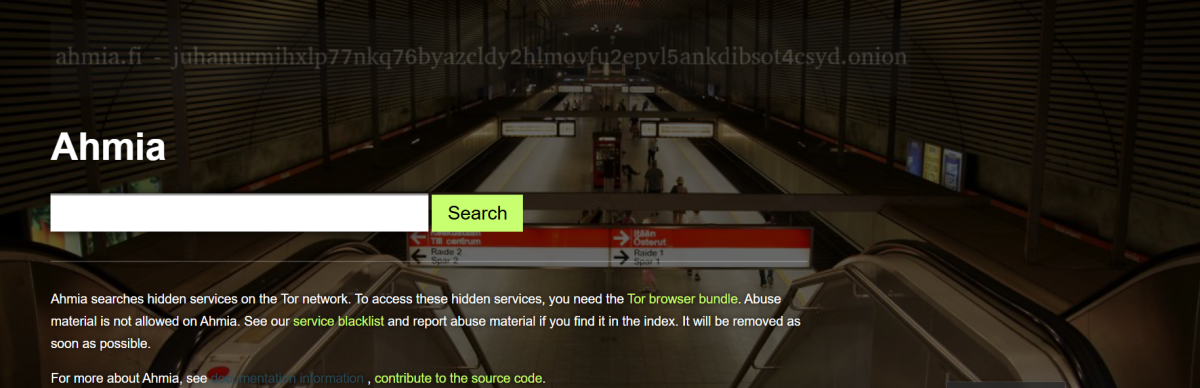
Quick Answer - Official Ahmia Onion Link To access the Ahmia search engine safely, download the official Tor Browser and paste the verified URL: juhanurmihxlp77nkq76byazcldy2hlmovfu2epvl5ankdibsot4csyd.onion.
Trust Signals for this URL: ✅ Active V3 onion address (latest encryption standard) ✅ No JavaScript trackers ✅ Direct connection to the Ahmia index
What is Ahmia Search Engine?
Ahmia is a specialized search engine developed to index Tor hidden services, making them accessible to researchers, journalists, and privacy-focused users. Unlike unmoderated indexes, the Ahmia project focuses on providing a cleaner experience by actively filtering out abusive material.
The system works by crawling onion services to record active sites, which is essential given how frequently hidden services go offline. You can access a clearnet version of Ahmia, but using the official Tor hidden service directly ensures your traffic remains entirely within the Tor network. For a deeper look at its features, read our full Ahmia search engine 2026 safety guide.
Official Onion Link & Mirror Safety
Finding the correct Ahmia working onion can be difficult because phishing clones are highly common. Because of this, many users search for an "Ahmia proxy" or Ahmia alternative links to bypass slow network relays.
However, you should be extremely cautious when looking for Ahmia mirrors. Malicious actors frequently set up fake sites that look identical to Ahmia to log your search queries or serve malware. The only way to guarantee a safe connection is to use the official URL provided above or to cross-reference links through a trusted directory like OnionLinks.live.
Never trust an Ahmia official mirror link posted on random clearnet forums, social media, or unverified wikis.
How to Access Ahmia Safely
Step 1 - Get the Tor Browser Go to the official Tor Project website and download the software for your device. Standard browsers (Chrome, Safari) lack the network configuration to resolve .onion suffixes.
Step 2 - Configure Security Settings Open the application and click "Connect." Once connected, go to your privacy settings (the shield icon) and ensure your security level is set to at least "Safer." This disables JavaScript, ensuring no trackers can run.
Step 3 - Enter the Verified URL Paste the official Ahmia onion address into the URL bar. Bookmark the page immediately so you do not have to type the long string of characters again.
Common Problems & Fixes
| Problem | Likely Cause | The Fix |
|---|---|---|
| "Onion Site Not Found" | Typo in the address, or incorrect system clock. | Double-check the URL. Sync your computer's system time (Tor requires exact time matching for V3 encryption). |
| Search results won't load | A slow or broken relay in your current path. | Click "New Circuit for this Site" in the Tor menu to establish a different routing path. |
| ISP blocking the connection | Your internet provider restricts Tor entry. | Configure a "Bridge" in your Tor connection settings to obfuscate your connection. |
| Page loads but looks broken | JavaScript is disabled (which is good for privacy). | Some site elements won't render on "Safest" mode. This is normal and means your browser is successfully blocking scripts. |
Safety Tips for Hidden Services
When using the Tor network, you are responsible for your own operational security. While Ahmia filters out many harmful sites, the broader network is an unmoderated environment. Do not download files unless you verify the source, as documents can contain tracking exploits. Understanding common darknet phishing tactics helps explain why malicious mirror sites are so prevalent.
To understand the technical mechanics protecting your privacy, you can read about how Tor works or review the official Tor Project documentation. If you want to compare results, you can explore the top dark web search engines of 2026 to see how different indexing technologies operate.
Frequently Asked Questions
Is the Ahmia search engine legal to use?
Yes. Using Ahmia and the Tor Browser is legal in most countries. It is an information retrieval tool focused on privacy. What you choose to do with the search results must comply with your local laws.
Why is the Ahmia URL so long?
The address is long because it is a V3 onion address. This format utilizes modern cryptographic standards compared to older, shorter V2 links, which were deprecated by the Tor Project due to security vulnerabilities.
Does Ahmia track my IP address? No. Ahmia is designed as a privacy-respecting search engine with no JavaScript trackers. Because you access it through the Tor network, the site only sees the IP address of the final Tor exit relay, not your actual home IP address.
Can I use an Ahmia proxy instead of Tor?
Using third-party proxies to access onion services is highly discouraged. Proxies can easily log your traffic and compromise your anonymity. Always use the official Tor Browser for accessing hidden services.
Can I use Ahmia on my mobile phone?
Yes. Download the official Tor Browser app from the Tor Project on the Google Play Store, or the Onion Browser for iOS. Once installed, the Ahmia address functions exactly as it does on a desktop.