
Tor bridges help users bypass ISP blocks, deep packet inspection, and national firewall restrictions when standard Tor connections fail. In 2026, obfs4, Snowflake, and WebTunnel remain the most effective bridge types for restoring access to the Tor network under heavy censorship. As governments, schools, workplaces, and telecom providers increasingly detect and block public Tor entry nodes, verified bridges have become essential for maintaining private, unrestricted access to the open internet.
This guide explains how Tor bridges work, how to get updated working bridges safely, and which transport protocol performs best against modern censorship systems. You will learn the differences between obfs4, Snowflake, and WebTunnel, how to configure them correctly inside Tor Browser, and how to fix common connection failures caused by protocol fingerprinting, active probing, and aggressive network filtering.
Last Updated: May 2026
Quick Answer
To get a verified Tor Bridges List 2026, open the Tor Browser connection screen, select "Tor is censored in my country," and request bridges directly from the integrated BridgeDB system. Checking the pre-loaded obfs4 or Snowflake boxes provides the fastest, safest way to bypass network filtering and connect immediately without manually pasting IP addresses.
What is a Tor Bridges List 2026?
A Tor bridge is an unlisted, private entry relay into the Tor network. Standard entry nodes are public, making them easy targets for telecom censorship and local firewall detection. Bridges remain hidden from public view. When you connect through one, your local network administrator only sees traffic going to an unknown IP address, not a known Tor node.
Understanding how onion routing works is key to seeing why bridges matter. Tor normally relies on three public relays: a guard, a middle, and an exit. A bridge acts as a substitute for that public guard node, shielding your initial handshake from surveillance systems.
A 2026 bridges list refers to the current, active collection of these private relay addresses and their cryptographic keys. Because censorship systems constantly scan and block bridge IPs, a list from a year or two ago is completely useless. The list must be dynamic. You are not looking for a static text file; you are looking for the active transport protocols that can fetch fresh, unblocked relays on demand.

Visual breakdown: Standard Tor connections expose the guard node to your ISP, triggering blocks. A bridge intercepts this handshake, making the traffic look like a standard HTTPS connection to an unlisted IP.
Why This Happens
Wrong habits
Many users copy bridge addresses from random forums or outdated Reddit threads. Publicly shared bridges are identified by automated censorship algorithms and blacklisted within days, rendering them useless for actual connectivity.
Outdated tools/info
Running an older version of Tor Browser means you are missing critical updates to pluggable transports. Evading protocol fingerprinting is a constant arms race, and 2026 requires the latest transport protocols to defeat modern traffic analysis.
Misunderstanding system
Users often confuse a bridge with a VPN. A bridge only hides the fact that you are using Tor from your local network; it does not encrypt your traffic outside of Tor's internal network. Misunderstanding this leads to false expectations about what a bridge actually protects.
External limitations
Even with a valid bridge, aggressive network administrators use connection filtering techniques. They send artificial traffic to a suspected bridge to see how it responds. If the server reacts like a Tor node, the IP is immediately blacklisted, regardless of whether it was on a private list.
Tor Bridges List 2026: Working Bridge Types
To fulfill the expectation of a working 2026 list, we must look at the specific bridge protocols available today. Your "list" consists of the active transport types built into the current Tor Browser. Below is the complete breakdown of the verified options.

Comparison visual showing the three primary bridge types, their disguise methods, and their primary use cases for 2026.
1. Verified obfs4 Bridges Still Active in 2026
What it is: obfs4 (obfuscation version 4) is a pluggable transport that scrambles the initial handshake between your Tor Browser and the bridge. It makes the connection look like random, encrypted data rather than a standard Tor protocol handshake.
Why it matters: It is the most widely supported and battle-tested bridge protocol. Most censorship circumvention tools default to obfs4 because it effectively defeats passive monitoring, which remains the most common form of network filtering globally.
Who uses it: Users facing standard corporate firewalls, basic national firewalls, and routine telecom restrictions. It is the default starting point for anyone needing a reliable bridge.
Strengths: obfs4 is highly stable once connected. It has very low latency compared to other transports, meaning your browsing speed inside the Tor network remains relatively normal. The protocol is integrated directly into the browser, requiring zero external software.
Limitations: obfs4 is susceptible to advanced firewall detection. If a censor suspects an IP address is an obfs4 bridge, they can probe it. Because obfs4 has a slightly distinct response pattern to invalid traffic, sophisticated censorship systems can identify and block it.
Beginner suitability: Excellent. It requires zero technical configuration. You simply check a box in the connection menu, and the browser handles the cryptography automatically.
2. Fastest Snowflake Bridges for Heavy Censorship
What it is: Snowflake routes your Tor connection through temporary WebRTC proxies run by global volunteers. Instead of connecting directly to a bridge IP, your traffic looks like standard WebRTC video call data going to a standard Content Delivery Network.
Why it matters: Snowflake defeats connection filtering and IP blacklisting entirely. Because the proxy IPs are ephemeral—lasting only as long as a volunteer has the Snowflake extension open—the censors have no static IP address to add to a blocklist.
Who uses it: Users under extreme censorship, such as those in heavily monitored regions where obfs4 bridges are systematically probed and blocked within hours of deployment.
Strengths: It is nearly impossible to block at the network level without breaking the wider internet. Blocking Snowflake means blocking all WebRTC traffic, which would break standard video conferencing tools for an entire country.
Limitations: Snowflake can be slower and less stable than obfs4. Because you are relying on a random volunteer's browser tab for your proxy, connections can drop if the volunteer closes their browser.
Beginner suitability: Very high. Like obfs4, it is a built-in checkbox option. The only minor hurdle is ensuring your local network is not blocking WebRTC traffic.
3. Updated WebTunnel Bridges for Deep Packet Inspection
What it is: WebTunnel is the newest addition to the Tor pluggable transport family, gaining massive traction in 2026. It disguises Tor traffic to look exactly like standard HTTPS communication with a specific, legitimate website.
Why it matters: It was specifically designed to defeat traffic analysis systems that look for deviations from standard TLS handshakes. Where obfs4 looks like random data, WebTunnel looks like normal traffic to a real website.
Who uses it: Users in environments using next-generation firewalls that perform certificate pinning and strict TLS analysis. It is becoming the go-to choice for journalists and activists facing advanced state-level censorship systems.
Strengths: It blends in perfectly with background web traffic. Censors cannot block it without blocking access to the legitimate website it is mimicking. It is highly resistant to both passive monitoring and active probing.
Limitations: Because it is newer, the pool of WebTunnel bridges is smaller than obfs4. It can also occasionally suffer from higher latency depending on the routing path to the mimicked website.
Beginner suitability: Moderate. It is built into the latest Tor Browser, but users must know to select it from the advanced bridge request menu, as it is not yet a default visible checkbox on the main screen for all regions.
Bridge Comparison Tables
To help you choose the right tool for your specific network environment, here is a direct comparison of the three primary transports.
Transport Feature Comparison
| Feature | obfs4 | Snowflake | WebTunnel |
|---|---|---|---|
| Disguise Method | Packet scrambling | WebRTC proxying | HTTPS mimicking |
| Connection Speed | Fast | Moderate | Moderate to Fast |
| Stability | High | Variable (depends on proxy) | High |
| Active Probing Resistance | Low | Very High | High |
| Traffic Analysis Resistance | Moderate | High | Very High |
| Requires External Proxies | No | Yes (Volunteers) | No |
Best Bridge Type by Country and Use-Case
| Scenario / Network Type | Recommended Bridge | Reason |
|---|---|---|
| Basic Network Throttling | obfs4 | Fastest speeds, easily bypasses basic DNS or IP blocks. |
| Corporate / University Firewalls | obfs4 or Snowflake | Snowflake works if WebRTC is allowed; obfs4 if it is blocked. |
| Aggressive National Firewalls | Snowflake | Defeats active probing and IP blacklisting used by advanced censors. |
| Next-Gen TLS Inspection | WebTunnel | The only transport that perfectly mimics standard HTTPS website traffic. |
| Unstable Connections | obfs4 | Lower latency and fewer dropped connections than proxy-based methods. |
How to Get Verified Tor Bridges Safely
First: Foundation setup
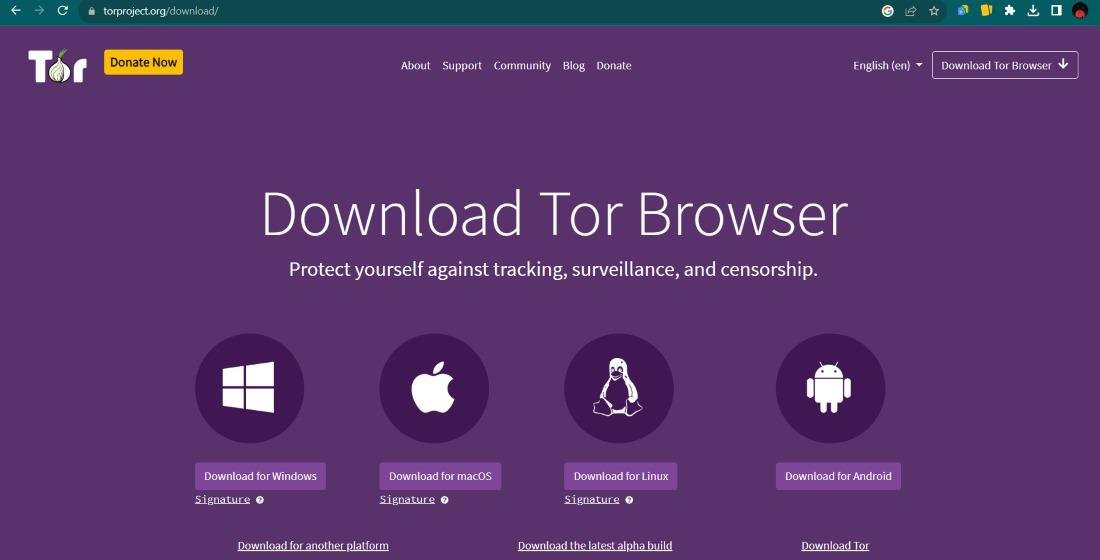
Before touching bridge settings, ensure you are using the most recent version of the Tor Browser. Old versions contain deprecated transports that censors easily defeat. Download the browser directly from the official Tor Project website and follow a safe Tor setup guide to ensure your base installation is clean.
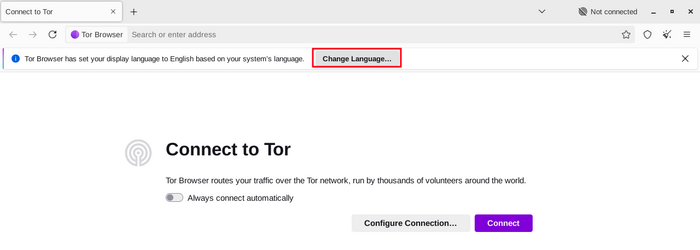
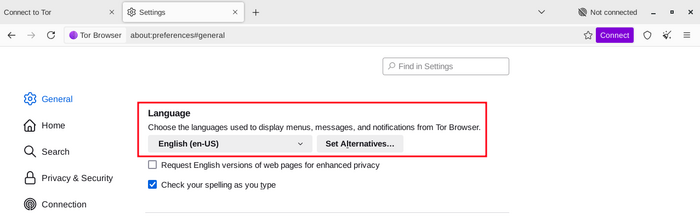
Visual guide: Where to find the "Tor is censored in my country" checkbox in the 2026 Tor Browser startup screen.
Next: Fix mistakes and habits
If your current bridges are failing, stop reusing old bridge lines. Delete any manually pasted bridges from your settings. Instead, click "Request a bridge from tor-project.org" (which connects to the official BridgeDB system) and select your desired transport. This uses a built-in tool called Moat, which fetches a fresh, unblocked set of bridges over a domain-fronted connection that your local network cannot see.
Finally: Improve system and tools
If standard bridge requests fail, you need an alternative way to access the system. If the Tor Project website is blocked in your country, you cannot use the visual Moat tool. In this scenario, send a blank email to bridges@tor-project.org with the phrase "get transport obfs4" or "get transport snowflake" in the subject line. The automated system will reply with a fresh batch of bridges. For users who want to understand how Tor compares to a VPN, combining a commercial VPN with Tor provides an outer layer of encryption that often bypasses the need for bridges entirely, as the ISP only sees VPN traffic.
Configure Tor Browser to use bridges
Learn how to configure Tor Browser to use bridges on desktop and Android. Bridges are alternative entry nodes to the Tor network that help bypass censorship when direct connections are blocked.
View for:
DesktopAndroid
If you're starting Tor Browser for the first time, click on "Configure Connection" to open the Tor settings window. In the "Bridges" section, from the option "Enter bridge addresses you already know" click on "Add new bridges" and enter each bridge address on a separate line. Click "Connect" to save your settings.
Or, if you have Tor Browser running, click on "Settings" in the hamburger menu (≡) and then on "Connection" in the sidebar. In the "Bridges" section, from the option "Enter bridge addresses you already know" click on "Add new bridges" and enter each bridge address on a separate line. Your settings will automatically be saved once you close the tab.
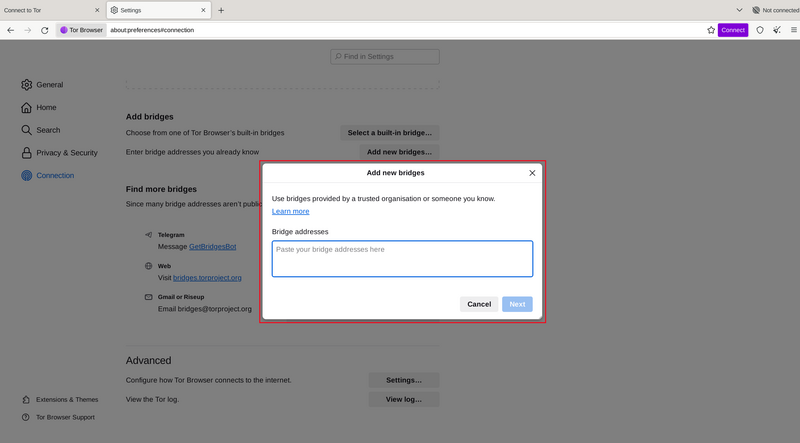
Visual guide: How to properly paste custom bridge lines into the Tor Browser advanced settings window.
Common Problems & Fixes
Problem: obfs4 bridges time out immediately after showing "Connecting"
This usually means your local network is using connection filtering to probe the bridge IPs you were given. Because obfs4 is vulnerable to this technique, censors in restrictive countries maintain real-time lists of suspected obfs4 nodes and drop connections to them instantly. Fix: Switch to Snowflake. Since Snowflake uses ephemeral WebRTC proxies, there are no static IPs for the censor to probe and block. Check the Snowflake box in the bridge settings and try connecting again.
Problem: Snowflake says "Connecting to bridge" but never completes the handshake
This occurs when your local network firewall or corporate network blocks WebRTC traffic. Snowflake relies entirely on WebRTC to function, and some strict network administrators disable it at the router level to prevent bandwidth leeching. Fix: Ensure WebRTC is enabled in your Tor Browser settings. If it is enabled and still fails, you are behind a WebRTC-blocking firewall. Your only option is to switch to obfs4 or WebTunnel, or connect through a personal VPN that escapes the local firewall first.
Problem: The Moat bridge request system fails to load
Moat relies on domain fronting to fetch bridges without the ISP knowing. Some regimes have begun blocking the specific CDN domains that Moat uses to disguise its requests. When this happens, the Moat CAPTCHA screen spins indefinitely or returns a connection error. Fix: Use the email fallback method. Open any email client and send a blank email to bridges@tor-project.org. Put "get transport webtunnel" in the subject line. The automated system will mail you back a list of working bridges within minutes, bypassing the Moat restriction entirely.
Pro Tips
- Never share your custom bridges: If you request bridges via email or Moat, those specific addresses are generated for you. Do not post them on social media. The moment a bridge address becomes public, it gets added to censorship blocklists. Keep your bridge lines private.
- Use WebTunnel for protocol fingerprinting: If you are in a country known for advanced internet filtering, skip obfs4 entirely. Go straight to requesting WebTunnel bridges, as they are specifically engineered to defeat TLS-level inspection that obfs4 cannot handle.
- Clear your state if connections are stuck: If Tor fails to connect using bridges, do not just keep clicking "Retry." Go to the connection settings, click "Remove," and clear all saved bridge data. Sometimes the browser caches a failed connection state that prevents future attempts from succeeding.
- Rotate transports based on time of day: Some censorship systems run active probing scripts during business hours but relax them at night. If obfs4 fails during the day, try connecting at night, or keep Snowflake as your daytime default and obfs4 as your nighttime default for better speeds.
Safety & Best Practices
Using bridges alters your threat model slightly. When you use a standard Tor connection, you rely on the randomness of the public guard node system. When you use a bridge, you are explicitly trusting the person or organization operating that specific bridge. While the Tor Project heavily vets bridge operators, you are concentrating trust in a single entry point rather than distributing it.
Furthermore, bridges do not make you anonymous to your ISP if the bridge fails. If your obfs4 connection drops and the browser falls back to a standard connection, your ISP will immediately see a clear Tor connection attempt. Always ensure the "Use a bridge" toggle is locked on. Many users compare this to using a VPN versus Tor, but remember a bridge only protects your entry into the network, whereas a VPN protects all traffic leaving your device.
Once you successfully connect, you can begin exploring the network safely. It helps to use a curated dark web directory to find legitimate .onion sites without stumbling into malicious honeypots. If you are looking for specific forums or marketplaces, you will eventually need to use specialized search engines. Platforms like Ahmia, Torch, and Not Evil act as the Google of the onion network, helping you locate specific content. For community discussions, many users rely on forums like Dread (which can be found via a comprehensive directory of onion links) to read real-time reviews of onion sites. Alternatively, you can check out an updated Hidden Wiki mirror or use the top dark web search engines to navigate efficiently. Standard security rules still apply: do not download unknown files, do not use your real name, and maintain strict operational security.
Related Guides
- Safe Tor Setup Guide for 2026
- What is Tor and How Does it Work?
- Tor vs VPN: Privacy, Anonymity, and Security
- Dark Web Directory 2026: Safe Access
- Top Dark Web Search Engines 2026
- obfs4 vs Snowflake vs WebTunnel: Which Tor Bridge Is Best?
- How to Fix Tor Browser Stuck on Connecting in 2026
FAQ
How do I get tor bridges if the Moat system is blocked in my country? Send a blank email from any webmail provider to bridges@tor-project.org with "get transport obfs4" or "get transport snowflake" in the subject line. The automated BridgeDB system will email you a fresh list of working bridges within minutes.
Why are my snowflake bridges not working even though I enabled them? Snowflake relies on WebRTC technology. If you are on a corporate or university network, the administrator may have blocked WebRTC traffic at the router level, preventing the browser from establishing a proxy connection.
Which 2026 bridge type is best for bypassing traffic analysis? WebTunnel is currently the best protocol for defeating traffic analysis. Unlike obfs4, which scrambles traffic, WebTunnel perfectly mimics standard HTTPS traffic to a legitimate website, making it invisible to advanced firewalls.
Can I use a VPN and a Tor bridge at the same time? Yes. Connecting to a commercial VPN before opening Tor Browser adds an outer layer of encryption. This hides the fact that you are using a bridge from your ISP, which is highly effective if your ISP actively blocks known bridge IP addresses.
Conclusion
Dealing with network filtering is frustrating, but a verified Tor Bridges List 2026 completely solves the problem by masking your entry into the network. By moving away from outdated static IP lists and relying on the dynamic fetching of obfs4, Snowflake, and WebTunnel transports, you can reliably bypass protocol fingerprinting and connection filtering. Configure your browser to request bridges automatically, keep your software updated, and switch between transport types if one method fails. Maintaining access to an open network requires adapting to the tools available right now, and these pluggable transports remain the most effective method for 2026.