


Introduction
If you use Tor Browser, you might think you are invisible. You are bouncing your traffic through relays, hiding your IP address, and masking your location. However, anonymity is not just about IP addresses. There is a more subtle method trackers use called browser fingerprinting. This is a common issue, and it happens because your browser configuration is often as unique as a real fingerprint. Many users face this because they don't realize that simply hiding their connection isn't enough. In this guide, you’ll learn exactly how websites track anonymous users, why fingerprinting works, and how to close the gaps in your privacy.
Quick Answer
Browser fingerprinting is a tracking method that identifies you by collecting data about your device and browser settings—like screen resolution, installed fonts, and browser version—rather than your IP address. To fix this, use the default Tor Browser settings and disable JavaScript, as these scripts are the primary tool used to gather these details.
What is Browser Fingerprinting?
Imagine walking into a room wearing a mask (Tor) but wearing a very specific pair of shoes and carrying a unique briefcase. Even if no one can see your face, they can track you across the city by your unique belongings.
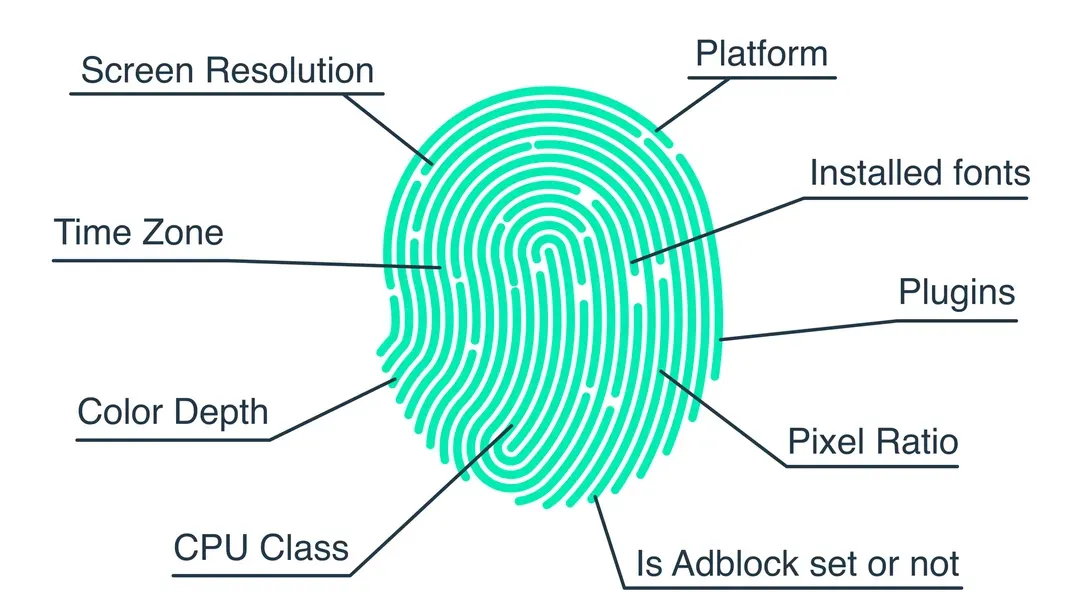
Browser fingerprinting works similarly. When you visit a website, the server can query your browser for information. It asks: "What is your screen size? What fonts do you have installed? What timezone are you in? What version of graphics card do you use?"
When combined, these data points create a unique profile or "fingerprint." Even if two people use the exact same laptop, if one has installed a font the other hasn't, or uses a slightly different zoom level, they are no longer identical. On the clearnet, this is used for ad tracking. On Tor, it can be used to deanonymize users or block them.
Why This Happens
The Need for Uniqueness
Websites need to know if you are a new visitor or a returning one. Cookies are the traditional way to do this, but Tor users often clear cookies. To get around this, advertisers and trackers turned to fingerprinting, which persists even if you wipe your browser history.
Fraud Prevention
Ironically, some security systems use fingerprinting to prevent fraud. Services like Cloudflare use it to distinguish between a human Tor user and a bot attack.
JavaScript
The "Why" almost always leads back to JavaScript. JavaScript is the engine that allows a website to query your device. Without it, the website remains largely blind to your specific configuration.
How Websites Track Anonymous Users
Websites track anonymous users by collecting specific attributes. On Tor, the browser tries to make you look like everyone else, but advanced scripts can still find the differences.
Tracking Methods Comparison
Different methods use different parts of your hardware and software to identify you.
| Tracking Method | How It Works | Effectiveness on Tor | Best Defense |
|---|---|---|---|
| Canvas Fingerprinting | Analyzes rendering of hidden images | High (if JS enabled) | Disable JS / Resist Fingerprinting Mode |
| Audio Fingerprinting | AudioContext API processing | Medium (if JS enabled) | Disable JS |
| Font Enumeration | Checks installed font list | Low (Tor restricts fonts) | Default Tor Settings |
| WebGL Fingerprinting | GPU graphics rendering capabilities | High (if JS enabled) | Disable JS |
| WebRTC Leaks | Peer-to-peer connection leaks | Low (Blocked by default) | Don't modify browser settings |
Canvas Fingerprinting
This is the most common method. HTML5 Canvas is an HTML element used to draw graphics via scripting. Because every computer renders graphics slightly differently (due to drivers, operating systems, and hardware), a website can draw a hidden image and analyze how your browser renders the pixels. The resulting hash is highly unique.
Audio Fingerprinting
Similar to canvas, this uses the AudioContext API. The website plays a silent sound or generates a specific sound wave. The way your sound card and browser process this audio is unique. This is harder to block than canvas without breaking the web entirely.
User Agent Analysis
The User Agent string tells the website your browser version and operating system. While Tor Browser spoofs this to look like a standard Windows user (even if you are on Linux), simple misconfigurations (like resizing the window) can give you away.
WebRTC Leaks
While Tor Browser blocks WebRTC by default, poorly configured Firefox instances or modified Tor setups can leak local IP addresses or unique device IDs through the WebRTC protocol. This allows a peer-to-peer connection outside the Tor tunnel.
Tor Browser vs. Standard Browsers (Fingerprinting)
It is important to understand why you shouldn't just use Chrome or Firefox with a VPN. The difference in protection against fingerprinting is massive.
| Feature | Tor Browser | Standard Browsers (Chrome/Firefox) |
|---|---|---|
| IP Address | Hidden | Visible (unless VPN is used) |
| JavaScript | Restricted by default | Enabled (Full access) |
| Fingerprint Uniqueness | Padded (Looks like all Tor users) | High (Unique per device) |
| User Agent | Spoofed (Generic Windows) | Real (Reveals OS/Browser) |
| Canvas Protection | Resisted Fingerprinting Mode | None (Active tracking possible) |
| Window Size | Forced uniform size | User customizable (Unique) |
Conclusion: Standard browsers provide the raw data needed for fingerprinting on a silver platter. Tor Browser fights back by lying about the data and limiting what scripts can ask for.
HOW TO FIX / IMPROVE
First: Use the Default Tor Browser
Do not use Firefox or Chrome with a Tor plugin. The Tor Browser is specifically patched to resist fingerprinting. It enforces a uniform window size and blocks common queries.
Next: Manage JavaScript
One of the most effective ways to stop canvas tracking and script-based fingerprinting is to restrict the code that runs on your site. You can learn how to disable JavaScript in Tor Browser to significantly reduce these signals. If you decide to disable scripts for maximum protection, discovering No JS onion sites can help you find platforms that work perfectly without risking your anonymity.
Finally: Avoid Extensions
Installing extra themes or extensions into Tor Browser makes you look unique. A clean, default Tor Browser looks exactly like every other default Tor Browser. As soon as you add an extension, you stand out.
COMMON PROBLEMS & FIXES
Problem: Cloudflare "Checking your browser" loop
Fix: This happens when Cloudflare cannot fingerprint you, so it treats you as suspicious. You can solve this by passing the CAPTCHA challenge or temporarily trying a new Tor circuit. This is actually a sign that your fingerprint protections are working.
Problem: Sites claiming "Unsupported Browser"
Fix: This usually happens on modern "Web 2.0" sites that require heavy JavaScript. You can try lowering the Security Slider to "Safer" instead of "Safest" to allow essential scripts, but be aware this increases your risk.
Problem: Fonts look different or broken
Fix: Tor Browser restricts fonts to a set list to prevent font fingerprinting. If a site uses a restricted font, it will look different or fail to load. Ignore this for maximum privacy.
PRO TIPS
- Don't Resize Your Window: Tor Browser forces a specific window size (typically 1000x1000 pixels) to make everyone look the same. If you maximize or resize the window, you break this uniformity and become identifiable.
- Enable "HTTPS-Only" Mode: While this doesn't stop fingerprinting, it ensures your data is encrypted, preventing passive network snooping.
- Update Regularly: The Tor Project constantly updates the "Resist Fingerprinting" code in the browser to counter new tracking methods. Keep your browser updated.
- Use a Bridge: If you are worried about your ISP knowing you are using Tor, use a bridge. It hides the fact that you are connecting to Tor.
SAFETY & BEST PRACTICES
While fingerprinting is a privacy risk, it is not the end of the world. The key is to blend in. Avoid doing things that make your browser look "special."
- Do not change the theme.
- Do not install Flash or plugins.
- Do not change the language settings to something obscure.
By maintaining the default "baseline" look, you blend into the crowd of millions of other Tor users. It is often safer to be anonymous as one of millions than a unique user in an empty room.
RELATED GUIDES
- How to Disable JavaScript in Tor Browser
- No JS Onion Sites
- Tor Security Levels Explained
- Can JavaScript Leak Your Real IP?
FAQ
Can they see my name if they fingerprint me?
No. Fingerprinting does not reveal your real-world identity (name/address). It simply allows them to track your browser across different visits. If you reveal your name on one site, they can link that name to your fingerprint on another site.
Is Tor Browser immune to fingerprinting?
It is highly resistant, but not immune. The developers are in a constant cat-and-mouse game with trackers. New methods (like GPU fingerprinting) are occasionally discovered, which is why keeping the browser updated is crucial.
Does Incognito Mode prevent fingerprinting?
No. Incognito mode on Chrome or Firefox simply deletes cookies and history on your computer. It does nothing to change your device's configuration. A website can still fingerprint you just as easily in Incognito mode.
Does VPN protect against fingerprinting?
No. A VPN hides your IP, but your browser configuration remains visible. If you use a VPN but visit a website that uses fingerprinting, they can still track you as a unique user, just without knowing your IP.
Is there a test I can run to check my fingerprint?
Yes. You can use services like AmIUnique or Cover Your Tracks. When running these tests on Tor Browser, your fingerprint should look generic (appearing identical to many other Tor users), not unique.
Can I use a VPN together with Tor to stop fingerprinting?
No. While a VPN adds an extra layer of encryption, it does not change what your browser reports to websites. If JavaScript is active, a tracker can still fingerprint you whether you use a VPN or not.
What if I disable "Resist Fingerprinting" in Tor settings?
It is highly recommended you leave this on. Disabling it allows your browser to report its actual OS and screen size, which makes you significantly more unique and easier to track.
CONCLUSION
Browser fingerprinting is a sophisticated threat, but it is not a magic bullet against anonymity. By understanding how websites track anonymous users through Canvas, Audio, and User Agent data, you can take steps to mitigate the risk. Stick to the default Tor Browser configuration, resist the urge to customize it, and learn how to disable JavaScript in Tor Browser to remove the primary tool trackers use. In 2026, the best way to stay anonymous isn't to hide in the dark—it's to look exactly like everyone else.